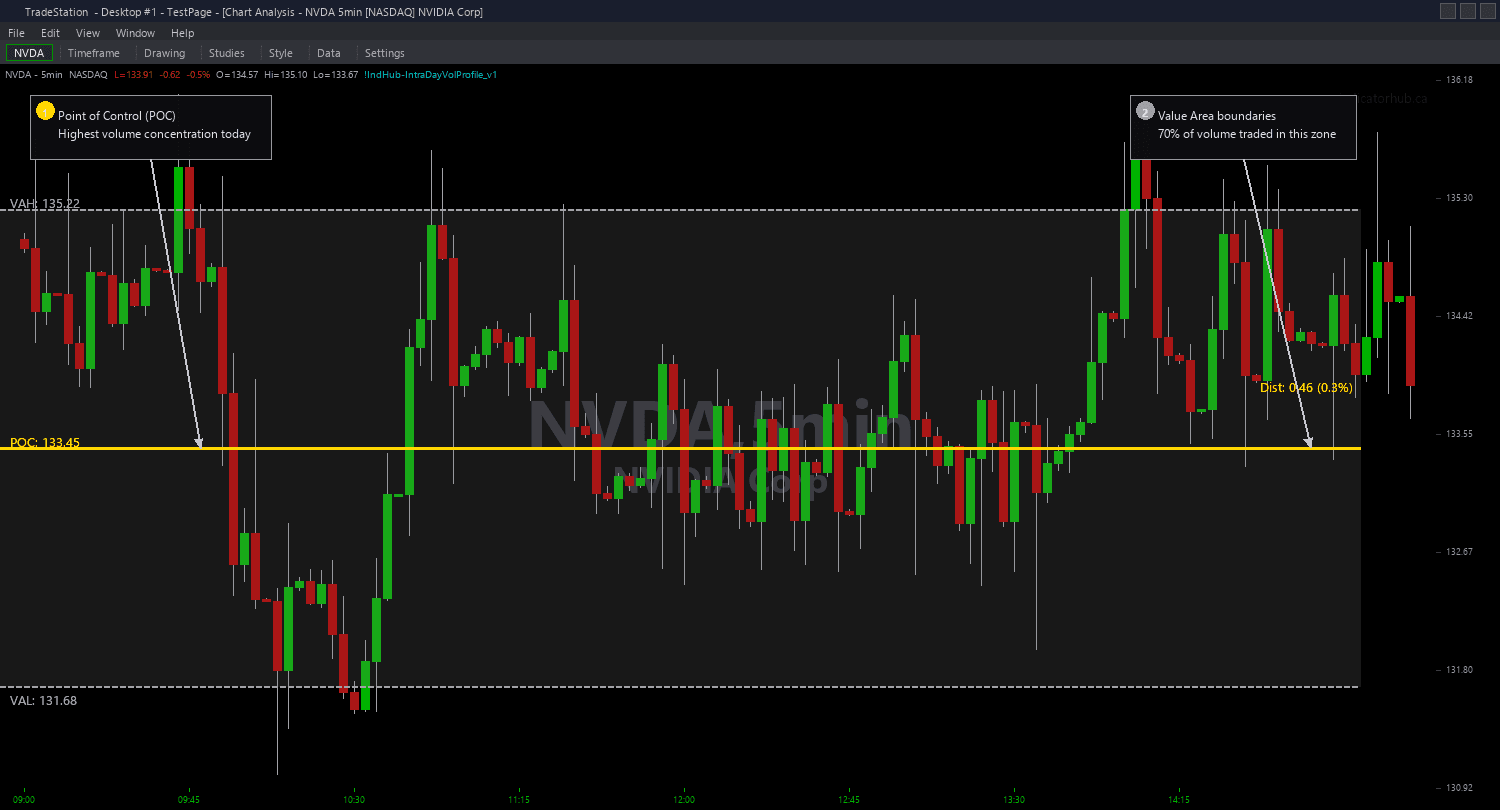
Intraday Volume Profile Chart
Intraday Volume Profile Chart calculates and draws the three key volume distribution levels on your chart: the Point of Control (POC) in gold, the Value Area High (VAH) in gray, and the Value Area Low (VAL) in gray. These levels update in real time throughout the session as new volume data arrives, giving you a continuously evolving picture of where the market's volume is concentrated.
- ●Gold horizontal line marks the POC — the price level where the most volume has traded during the current session. Price tends to gravitate toward this level like a magnet during balanced markets
- ●Gray horizontal lines mark VAH and VAL — the upper and lower boundaries of the Value Area, the range containing 70% of total session volume. Price inside the Value Area is in balance; price outside is in directional conviction
- ●Optional previous day POC, VAH, and VAL drawn as dashed lines in subdued colors — yesterday's volume distribution levels often act as support and resistance in the current session
- ●iMethod input selects the calculation approach: 1 = POC Binning (divides session range into iNumBins price bins and counts volume per bin), 2 = VWAP Bands (uses VWAP as POC proxy and iStdDevMult standard deviation bands as Value Area)
- ●iNumBins (default 30) controls resolution for Method 1 — more bins give finer granularity but need more session range to be meaningful
- ●iValueAreaPct (default 70) controls the Value Area percentage — 70% is standard but some traders use 68% (one standard deviation) or 80% for wider areas
- ●iStdDevMult (default 1.0) controls VWAP band width for Method 2 — 1.0 approximates the standard Value Area, increase for wider bands
- ●ShowPrevDay (default true) toggles previous day level display
- ●Plot1 outputs the current POC price, Plot2 outputs VAH, Plot3 outputs VAL for use in other studies or strategies
The most actionable setups occur at the Value Area boundaries. When price trades down to VAL from inside the Value Area, expect a bounce back toward POC. When price breaks below VAL and holds, it signals a shift from balanced to directional selling. The POC itself acts as a magnet — during choppy sessions, price repeatedly returns to the POC level.
Previous day levels provide critical reference points. If today's price opens above yesterday's VAH, the market is accepting higher prices. If it opens below yesterday's VAL, the market is accepting lower prices. Opening inside yesterday's Value Area suggests a rotational day.
All calculations use the current session's data. Levels update on each bar close.
30-Day Money-Back Guarantee
Try it risk-free. Not satisfied? Full refund, no questions asked.
Part of the Intraday Volume Profile Bundle
Get all 4 study types for $65 — save $30
Who This Is For
Intraday Volume Profile Chart is built for day traders who use volume distribution analysis to identify fair value, support, and resistance for the current session. If you use Market Profile or Volume Profile concepts in your trading, this indicator brings those levels directly to your chart without requiring specialized Market Profile software.
Apply it to 1-minute to 5-minute charts on liquid instruments: index futures (ES, NQ, YM), NASDAQ-100 stocks, and high-volume ETFs. The indicator needs sufficient intraday volume to produce meaningful distributions — thin or illiquid instruments may not generate reliable POC and Value Area levels.
Method 1 (POC Binning) is recommended for instruments with tight spreads and high tick volume (ES, NQ, SPY) where precise bin-level volume counting produces clean results. Method 2 (VWAP Bands) works better on instruments where volume data is less granular or when you want a computationally lighter approach.
Key trading workflow: at the start of each session, note where price opens relative to yesterday's POC, VAH, and VAL. If price opens inside the prior Value Area, expect a rotational day and trade mean-reversion toward POC. If price opens outside and holds, expect a trending day and trade in the direction of the break. As the current session develops, watch for acceptance or rejection at the developing POC and Value Area boundaries.
Combines well with Order Blocks and Fair Value Gaps. An order block zone that aligns with the Value Area Low provides strong confluence for a long entry. A Fair Value Gap at the POC level doubles the significance of both concepts.
See It in Action
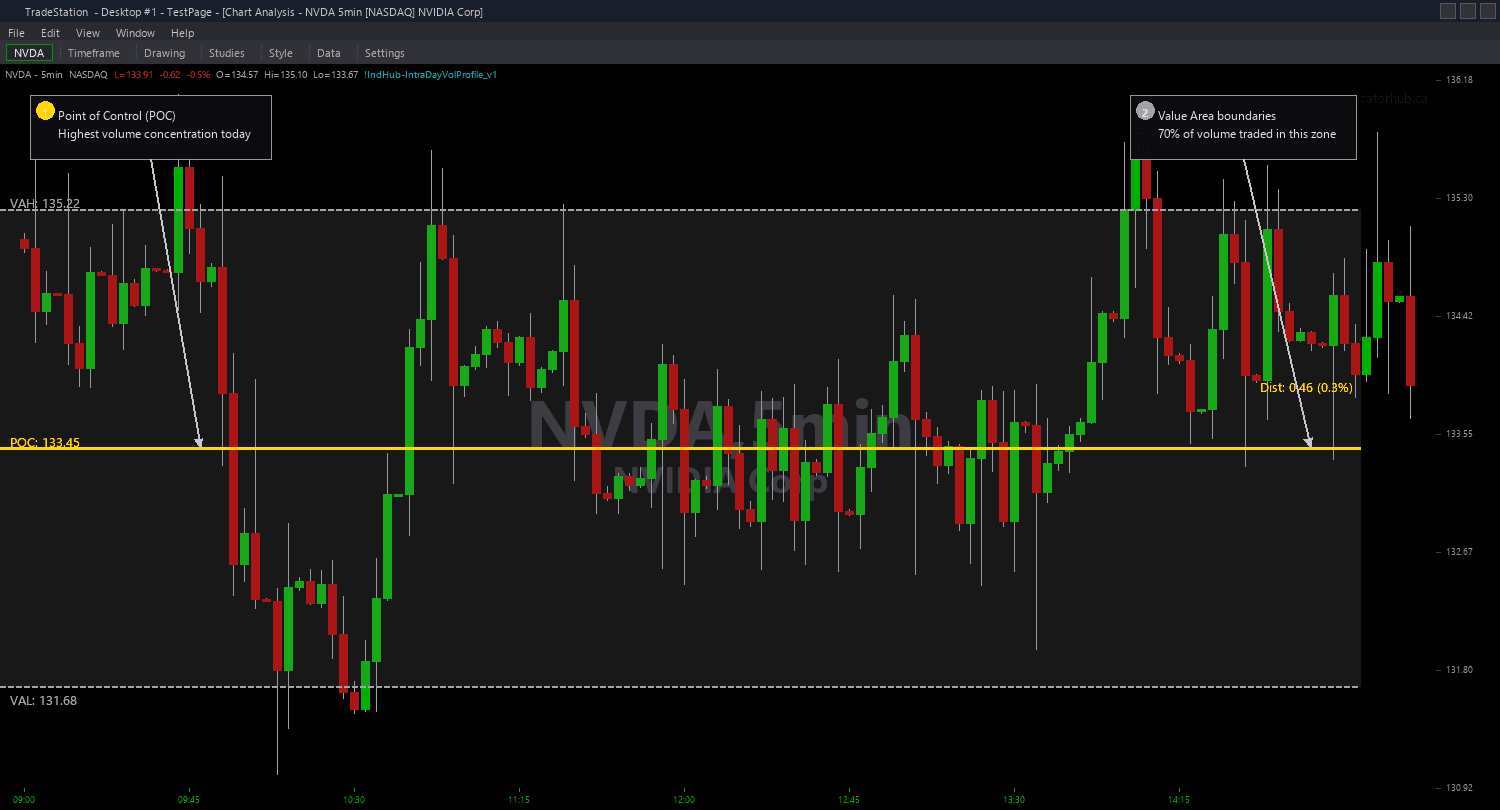
Example chart showing Intraday Volume Profile Chart on a live trading session
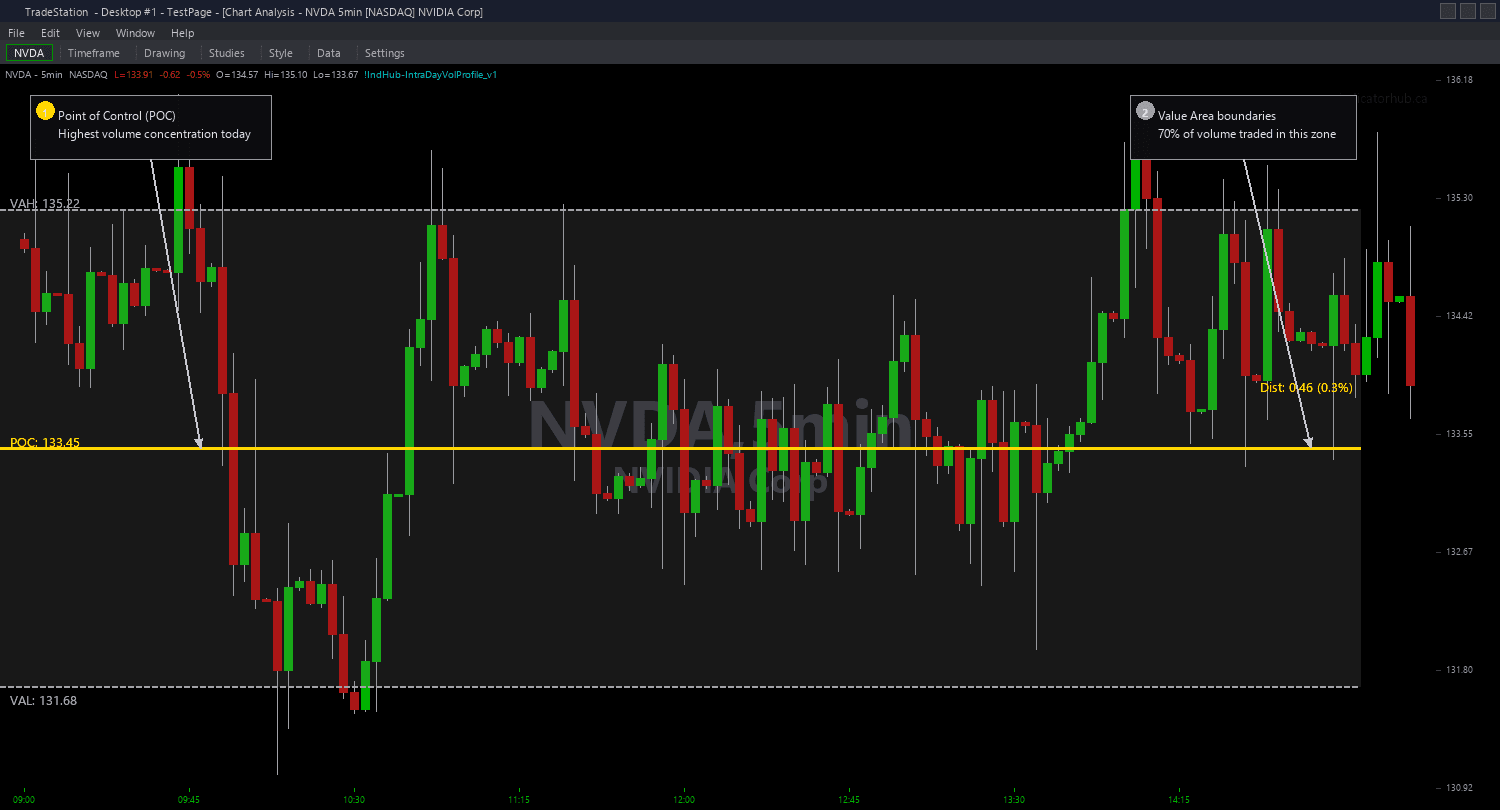
Example chart showing Intraday Volume Profile Chart on a live trading session
Installation Guide
Step 1: Download the indicator file
After purchasing, you will receive a download link via email. Click the link and save the volume-profile-chart.eld file to your computer. Save it somewhere easy to find like your Desktop or Downloads folder.
Step 2: Open the Import Wizard
Open TradeStation. Click the File menu in the top-left corner, then select Import/Export EasyLanguage to launch the Import/Export Wizard.
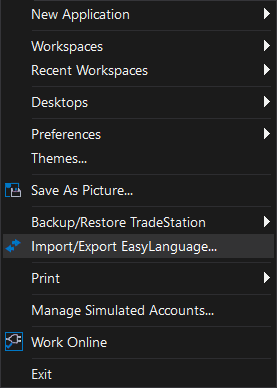
Step 3: Select the import type
In the Import/Export Wizard, select "Import EasyLanguage file (ELD, ELS or ELA)" from the list. Click Next to continue.
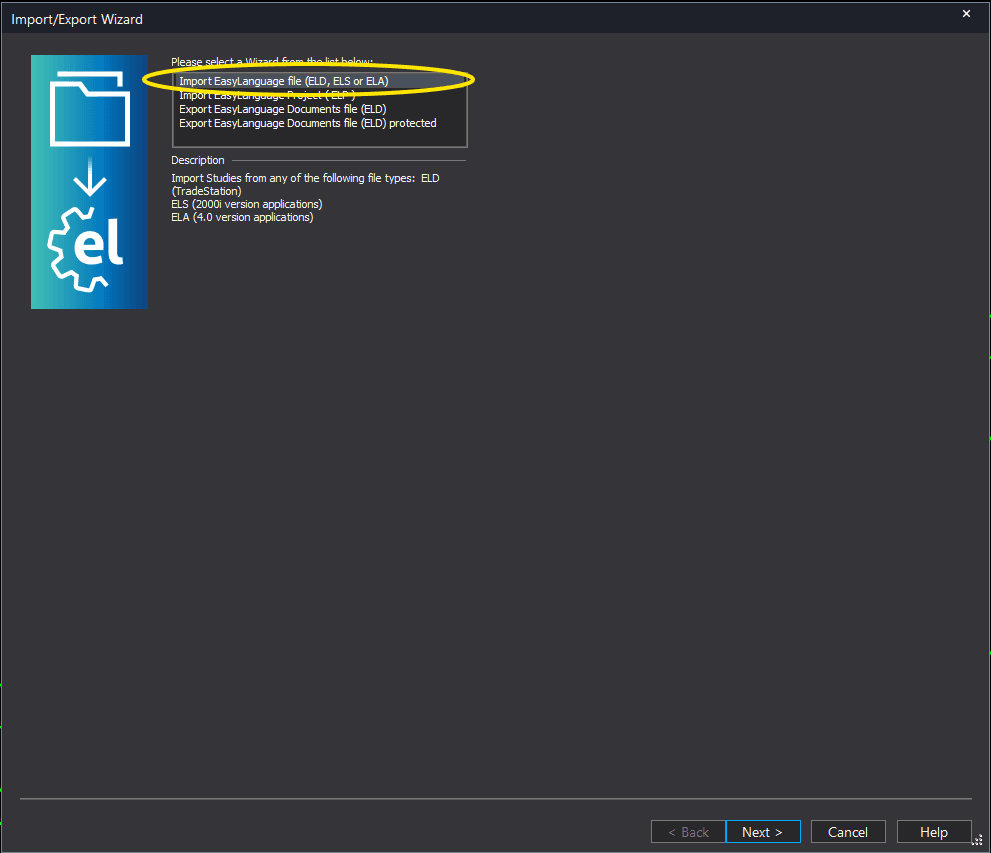
Step 4: Browse for the file
Click the Browse button to open a file browser where you can locate your downloaded .ELD file.
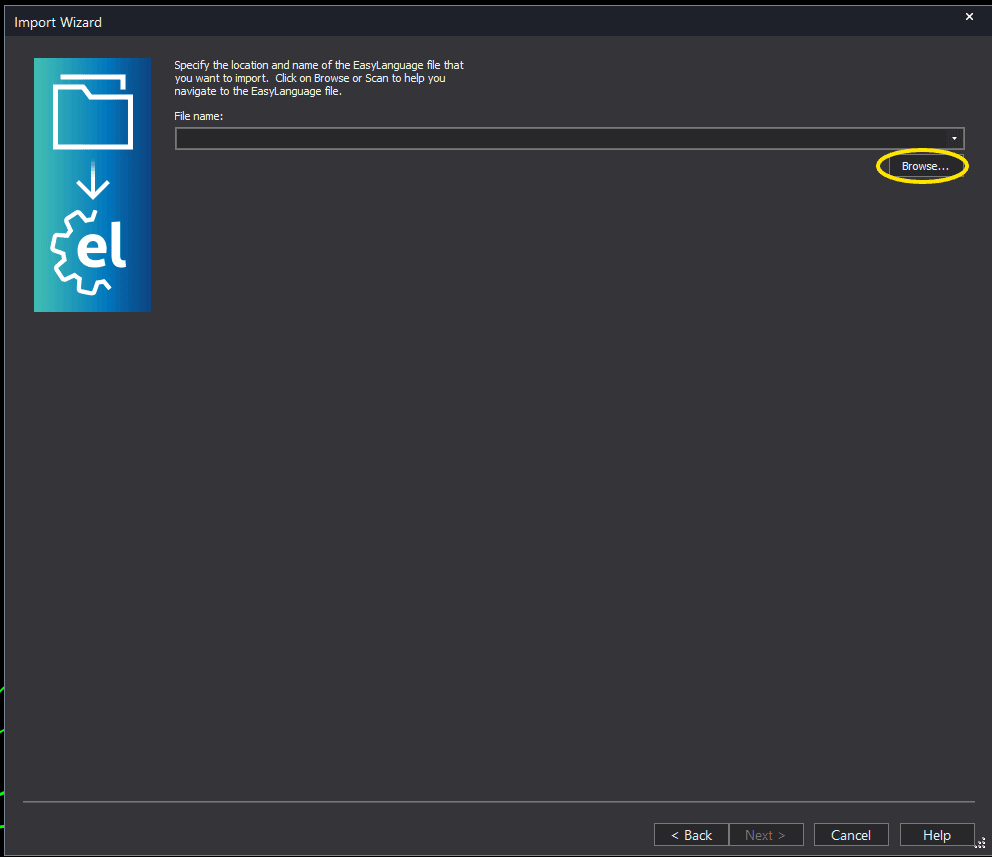
Step 5: Select and open the file
Navigate to the folder where you saved the .ELD file. Select volume-profile-chart.eld and click Open. The file name shown may differ from the screenshot — look for your downloaded indicator file.
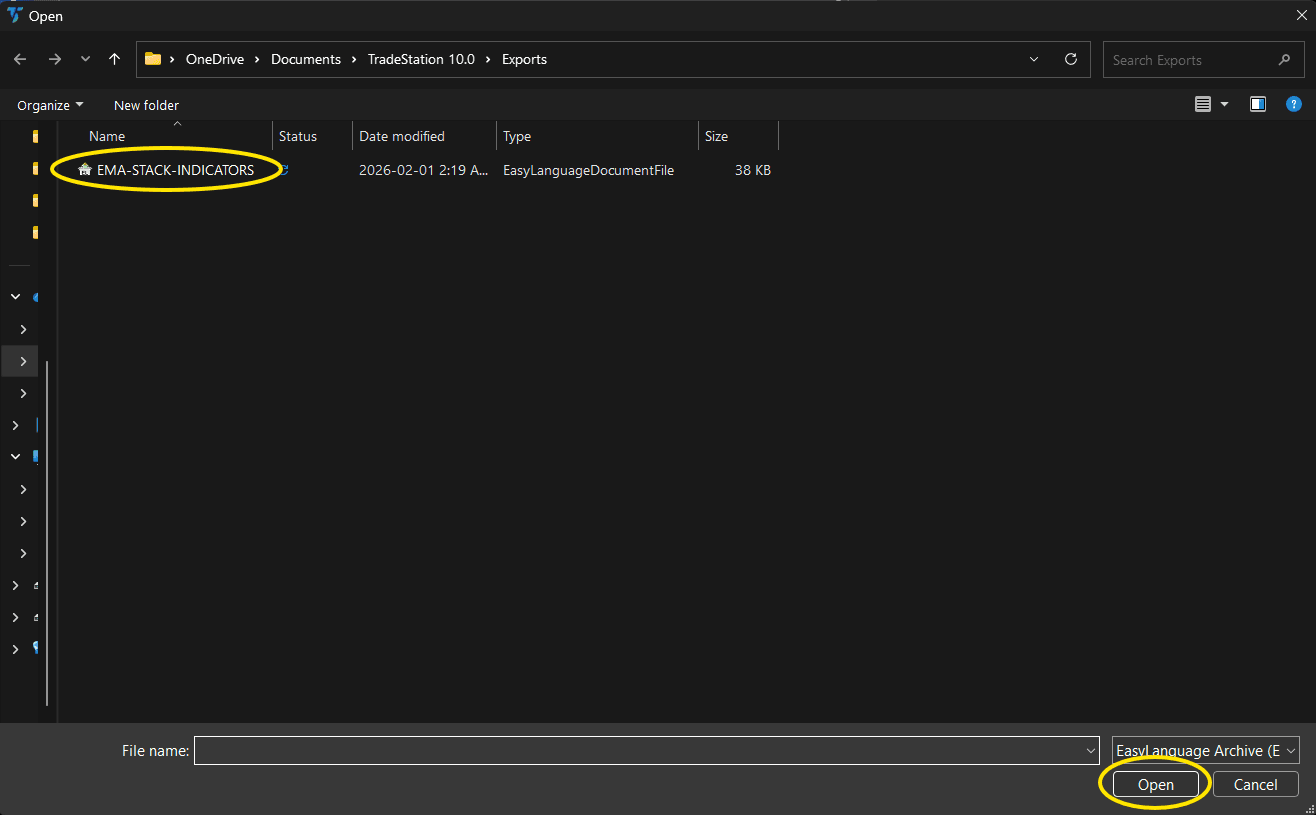
Step 6: Open the Studies menu
On your chart, click the Studies dropdown in the toolbar and select Add Study.
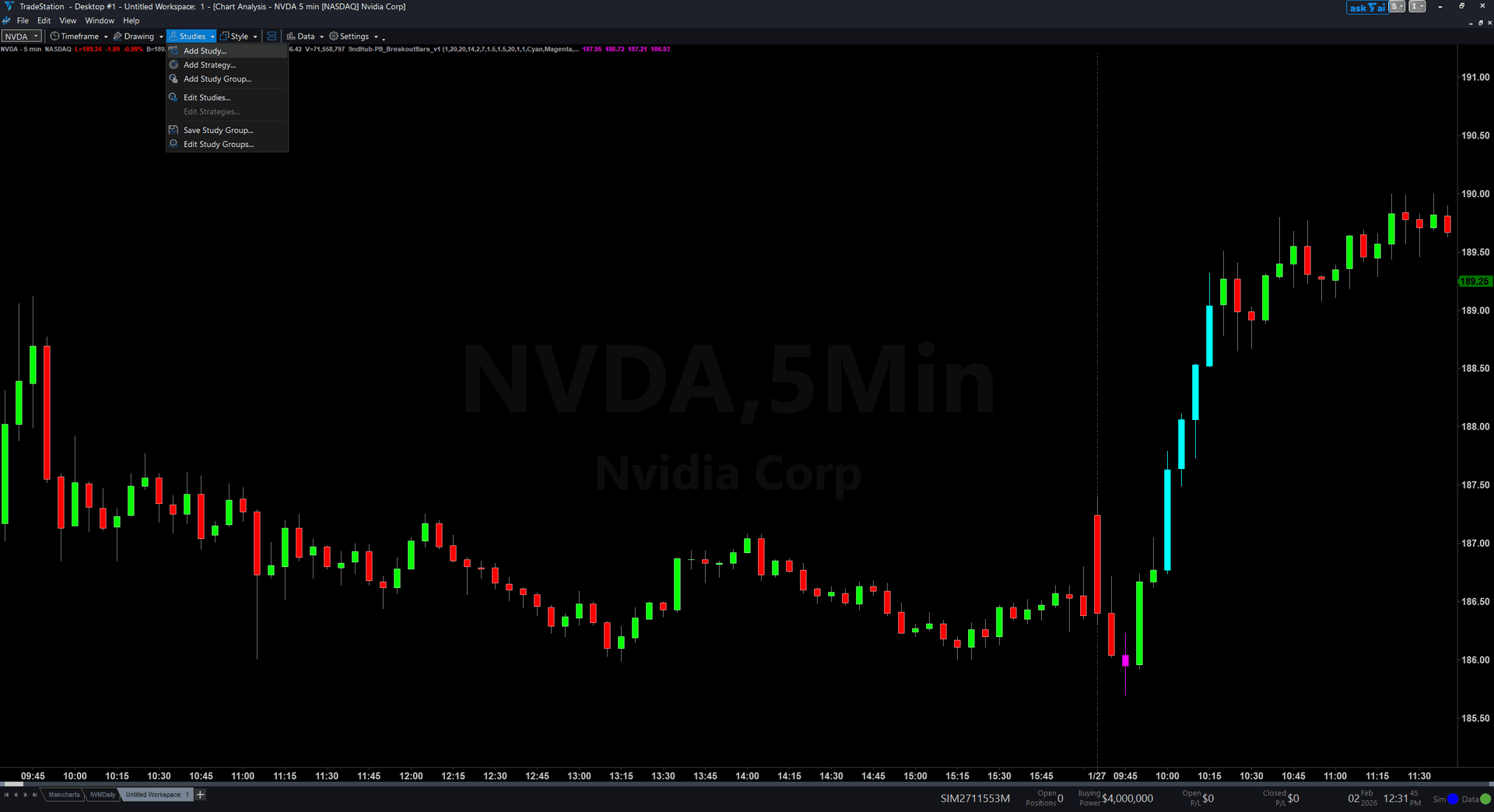
Step 7: Select the indicator
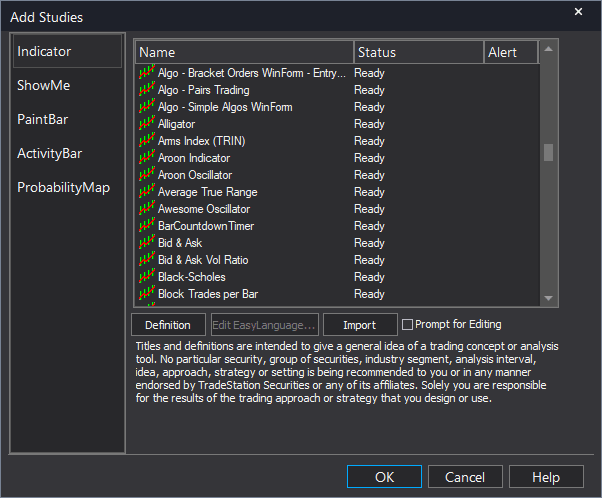
In the Add Studies dialog, make sure the Indicator tab is selected on the left side. Find "!IndHub-IntraDayVolProfile_Chart_v1" in the list, select it, and click OK to apply.
Step 8: Configure settings (optional)
Right-click anywhere on the chart, go to Studies > Edit Studies..., select the indicator, and click the Inputs tab. Key inputs: iMethod (1=POC Binning, 2=VWAP Bands), iNumBins (default 30, resolution for Method 1), iValueAreaPct (default 70), iStdDevMult (default 1.0, band width for Method 2), ShowPrevDay (default true), POCColor (default Gold), VAHColor/VALColor (default DarkGray). Most traders start with Method 1 and default bins.
Common Issues
The POC and Value Area lines jump around a lot during the first hour. Is this normal?
Yes. Early in the session, the volume distribution is based on limited data, so the POC and Value Area boundaries are unstable. As more volume accumulates throughout the day, the levels stabilize. The POC typically settles into a reliable level by mid-morning (10:30-11:00 AM ET). Early-session levels should be treated as preliminary, not as firm support and resistance.
Method 1 (Binning) and Method 2 (VWAP Bands) give me different levels. Which is more accurate?
Method 1 is more precise because it counts actual volume per price bin and identifies the exact level with the most volume. Method 2 uses VWAP as a proxy, which is an approximation — VWAP represents the average price weighted by volume, not the price with the most volume. Use Method 1 when your instrument has reliable volume data. Use Method 2 when volume data is sparse or when you want lighter computation.
Can I use this on daily or weekly charts?
The indicator is designed for intraday charts where it calculates volume distribution for the current trading session. On daily charts, each bar IS a session, so the intraday distribution concept does not apply. For multi-day volume profiles, you would need a different approach. This indicator works best on 1-minute to 15-minute charts.
The previous day lines are not showing even though ShowPrevDay is true.
Previous day levels require that the chart has enough historical data to include yesterday's session. If your chart only loads the current day, no previous day data exists. Increase the number of days loaded in your chart settings. Also ensure your chart uses an intraday interval — previous day levels are not calculated on daily or higher timeframes.
For additional help, contact support.