Volume Imbalance Chart
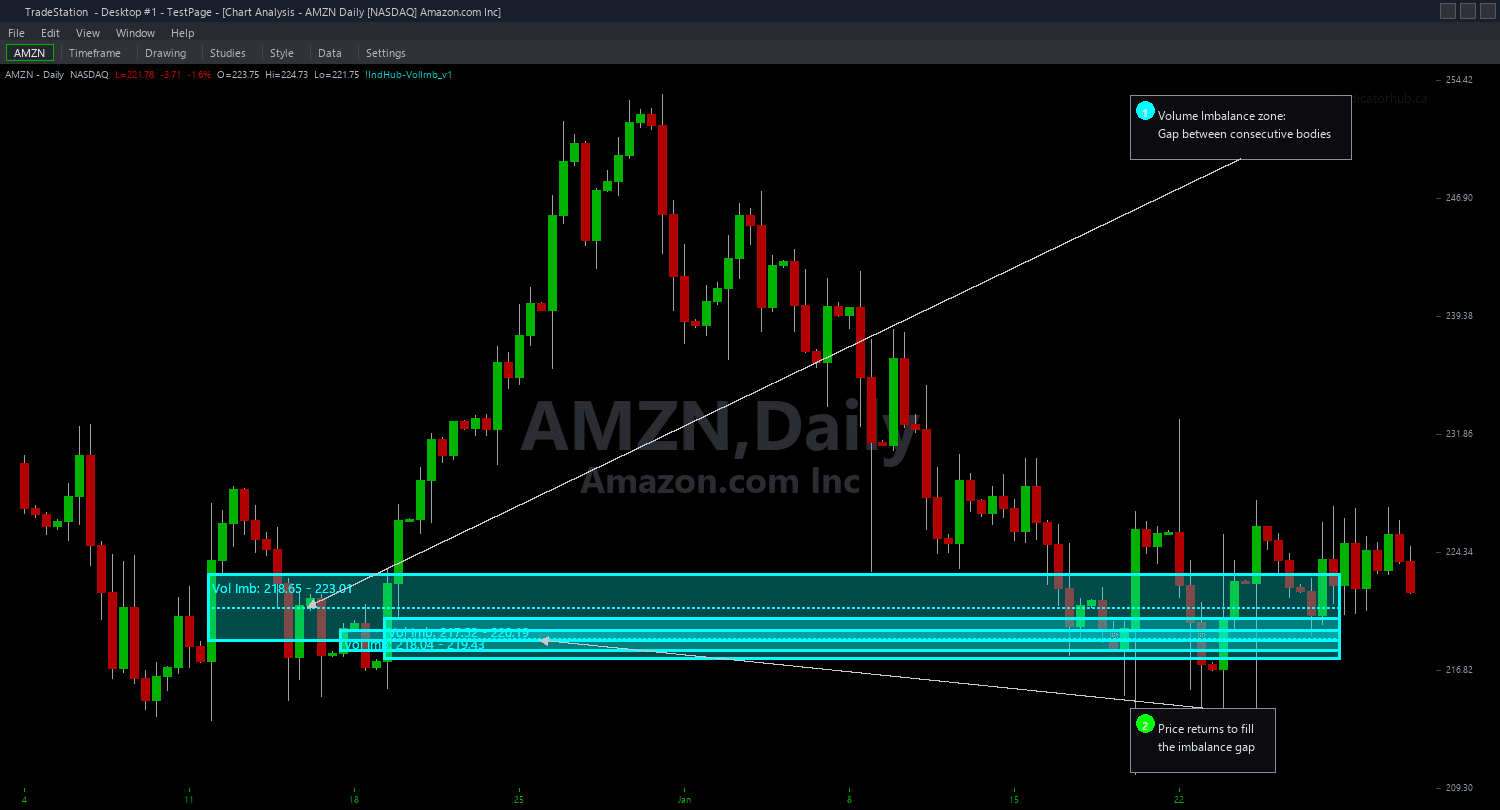
Volume Imbalance Chart detects the 2-candle body-to-body gap pattern and draws color-coded zones on your chart. A bullish Volume Imbalance forms when the close of one candle is below the open of the next candle — the gap between them represents untraded institutional demand. A bearish Volume Imbalance forms when the close of one candle is above the open of the next candle — untraded institutional supply.
- ●Green zones mark bullish Volume Imbalances (demand) — the gap between the first candle's close and the second candle's open where no trading occurred on the way up
- ●Red zones mark bearish Volume Imbalances (supply) — the gap between the first candle's close and the second candle's open where no trading occurred on the way down
- ●50% midpoint line drawn inside each zone marks the key level where institutional rebalancing is most likely to trigger a reaction
- ●MinGapATR (default 0.1) filters out noise gaps by requiring a minimum gap size as a multiple of the 14-bar ATR — raise this to see only significant gaps
- ●RequireVolSpike (default false) adds an optional volume filter requiring either candle's volume to exceed a configurable multiple of the 20-bar average — confirms the gap was backed by institutional participation
- ●MaxAge (default 75 bars) automatically expires zones that price never returned to fill
- ●MaxZones (default 10) limits simultaneous zones per side to keep charts clean
- ●Automatic mitigation removes zones when price closes through them — bullish zone removed when close breaks below the zone bottom, bearish zone removed when close breaks above the zone top
- ●Plot1 outputs +1 inside a bullish zone, -1 inside a bearish zone, and 0 outside for subgraph reference
The key difference from Fair Value Gaps: FVGs use a 3-candle wick-to-wick pattern (the gap between candle 1's wick and candle 3's wick), while Volume Imbalances use a 2-candle body-to-body pattern (the gap between consecutive candle bodies). Volume Imbalances are rarer but represent more extreme momentum — the bodies themselves do not overlap, meaning price did not even attempt to trade at those levels.
The highest-probability setups occur when price returns to fill a fresh Volume Imbalance and touches the midpoint — this is where the institutional rebalancing is most concentrated.
All detection uses completed bar data only. Non-repainting guaranteed.
30-Day Money-Back Guarantee
Try it risk-free. Not satisfied? Full refund, no questions asked.
Part of the Volume Imbalance Bundle
Get all 4 study types for $65 — save $30
Who This Is For
Volume Imbalance Chart is built for SMC and price action traders who want to identify the most aggressive institutional gaps — levels where price jumped so fast that consecutive candle bodies do not overlap. If you already trade Fair Value Gaps, Volume Imbalances give you a complementary set of higher-conviction zones.
Use it on intraday charts (1-minute to 15-minute) for day trading gap-fill setups. The default MinGapATR of 0.1 catches most meaningful body-to-body gaps. On volatile instruments or higher timeframes, increase to 0.25 or higher to filter out small gaps. Enable RequireVolSpike to add a volume confirmation layer.
The indicator works on any liquid market. Best results on index futures (ES, NQ), NASDAQ-100 stocks, and high-volume ETFs where body-to-body gaps reflect genuine institutional momentum rather than low-liquidity jumps.
Look for fresh Volume Imbalance zones that have not been revisited. When price returns and approaches the midpoint, that is your entry zone. The body-to-body gap is a more aggressive signal than a wick-to-wick FVG, so zones have a higher expected fill rate. Place stops beyond the opposite zone boundary for well-defined risk.
Combines powerfully with Fair Value Gaps, Order Blocks, and Rejection Blocks. When a Volume Imbalance zone overlaps with an FVG or sits inside an Order Block, you have multi-concept confluence for the highest-probability setups.
See It in Action
Example chart showing Volume Imbalance Chart on a live trading session
Example chart showing Volume Imbalance Chart on a live trading session
Installation Guide
Step 1: Download the indicator file
After purchasing, you will receive a download link via email. Click the link and save the volume-imbalance-chart.eld file to your computer. Save it somewhere easy to find like your Desktop or Downloads folder.
Step 2: Open the Import Wizard
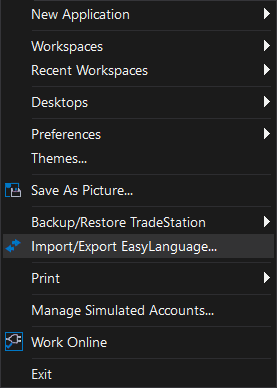
Open TradeStation. Click the File menu in the top-left corner, then select Import/Export EasyLanguage to launch the Import/Export Wizard.
Step 3: Select the import type
In the Import/Export Wizard, select "Import EasyLanguage file (ELD, ELS or ELA)" from the list. Click Next to continue.
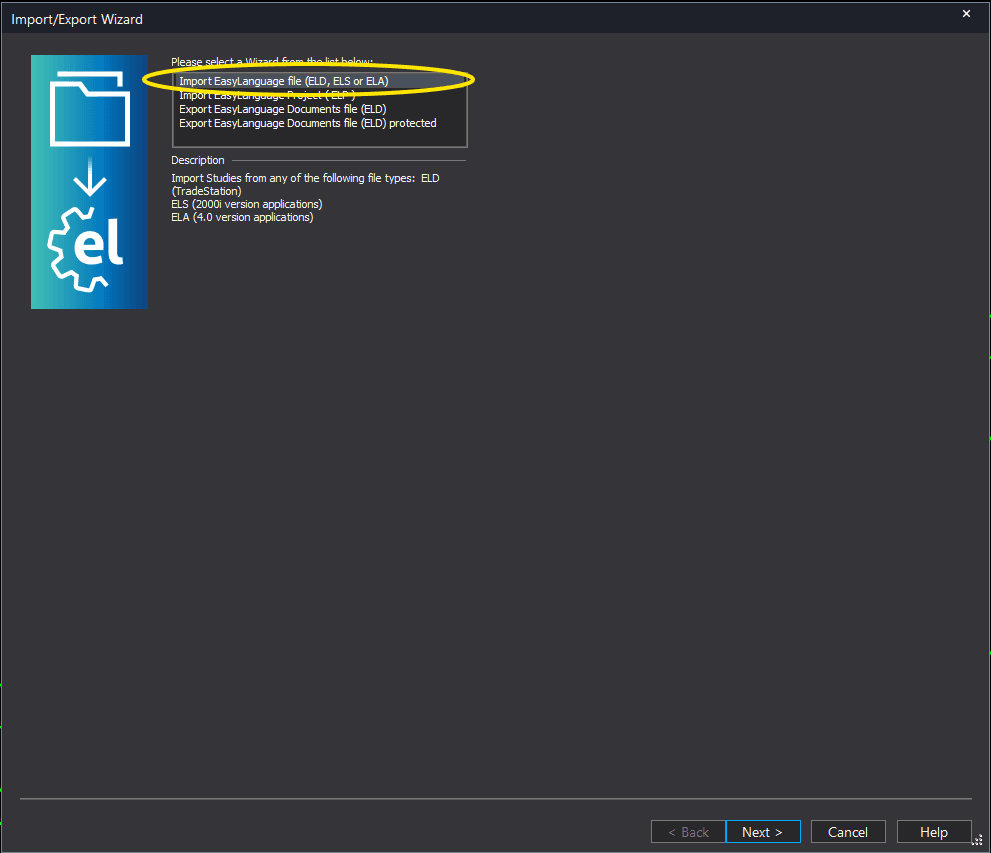
Step 4: Browse for the file
Click the Browse button to open a file browser where you can locate your downloaded .ELD file.
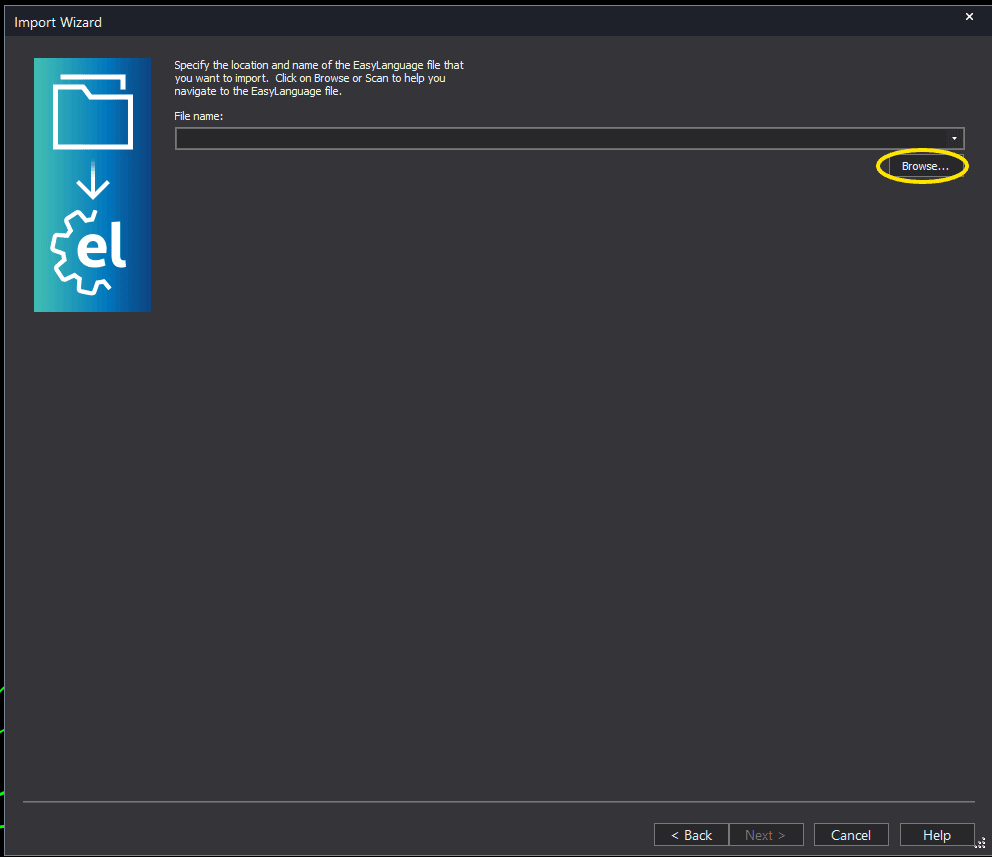
Step 5: Select and open the file
Navigate to the folder where you saved the .ELD file. Select volume-imbalance-chart.eld and click Open. The file name shown may differ from the screenshot — look for your downloaded indicator file.
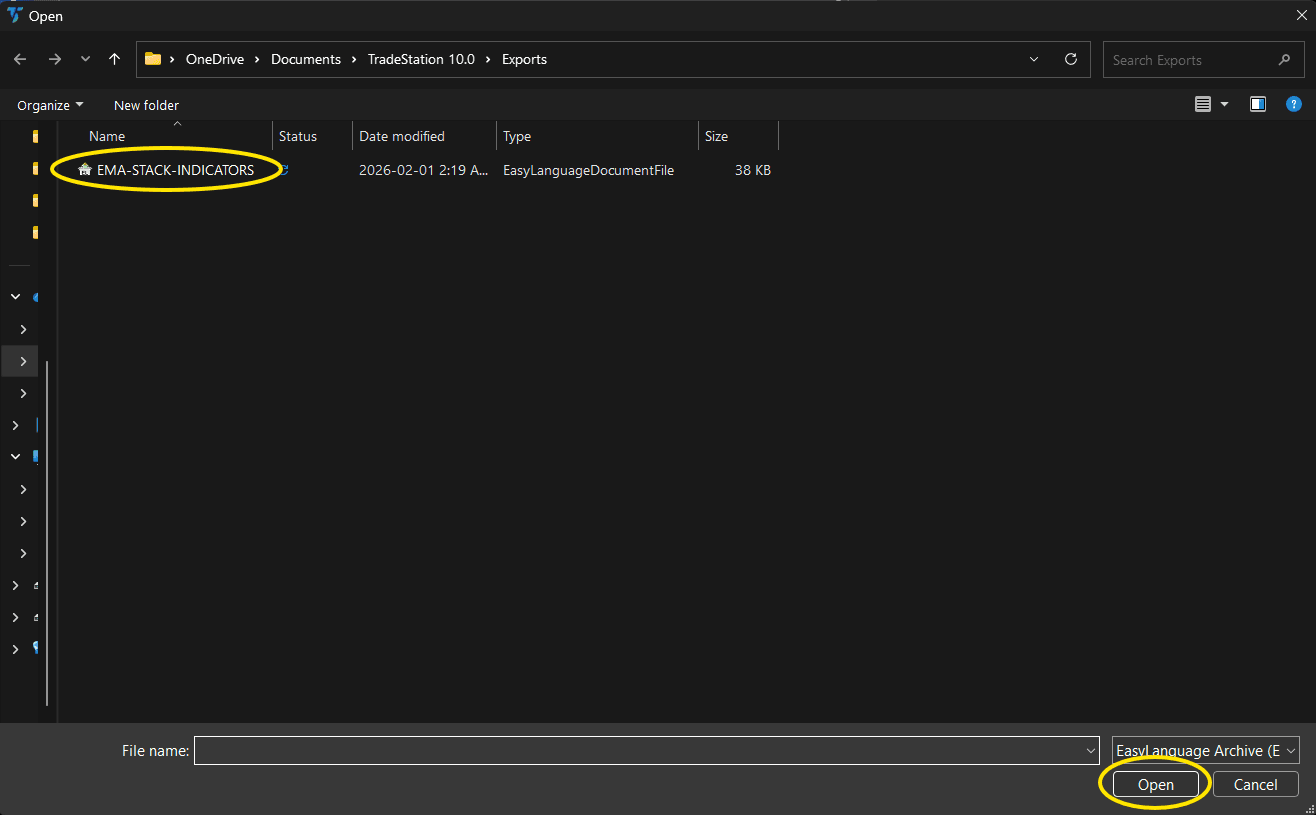
Step 6: Open the Studies menu
On your chart, click the Studies dropdown in the toolbar and select Add Study.
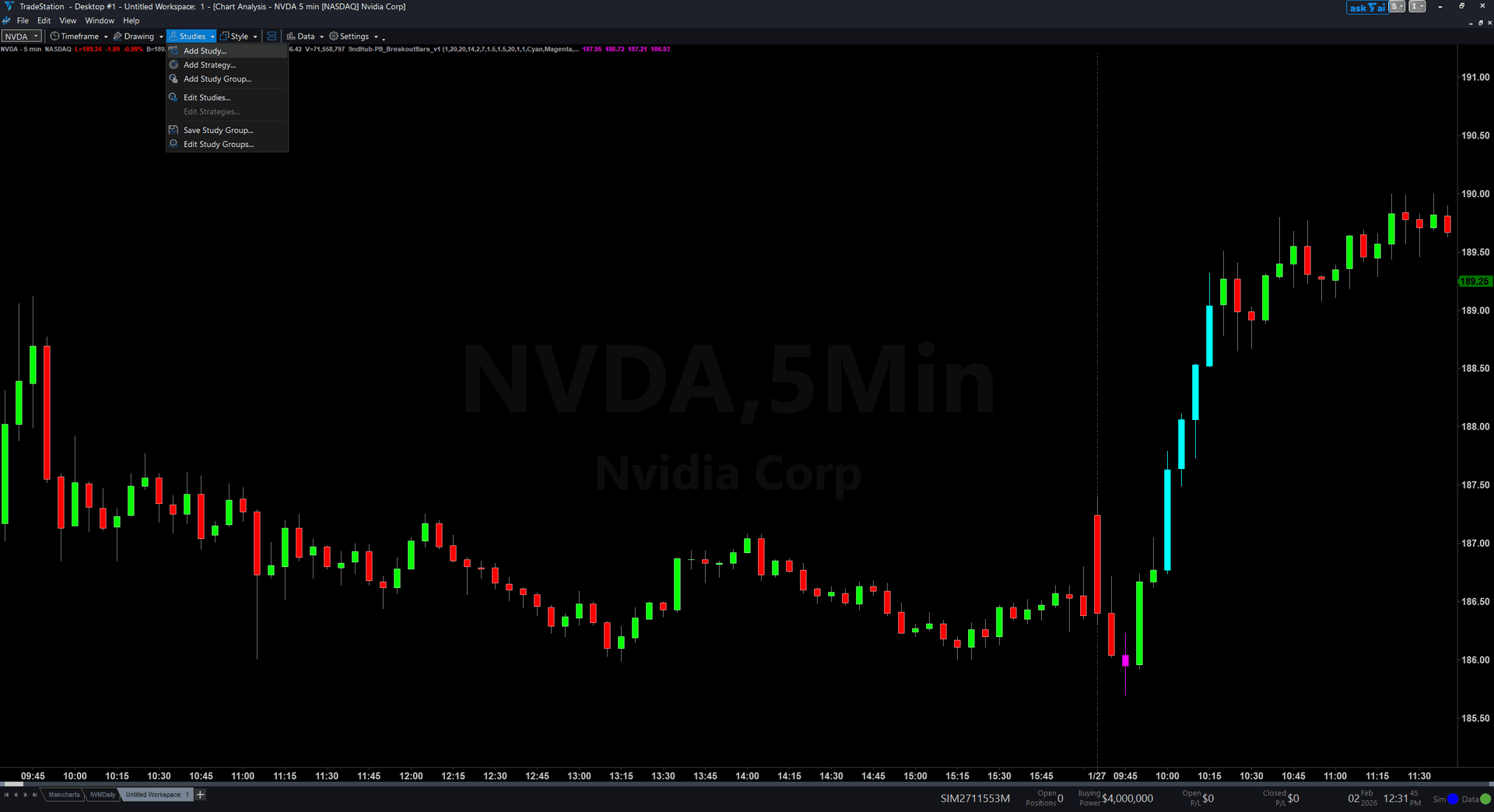
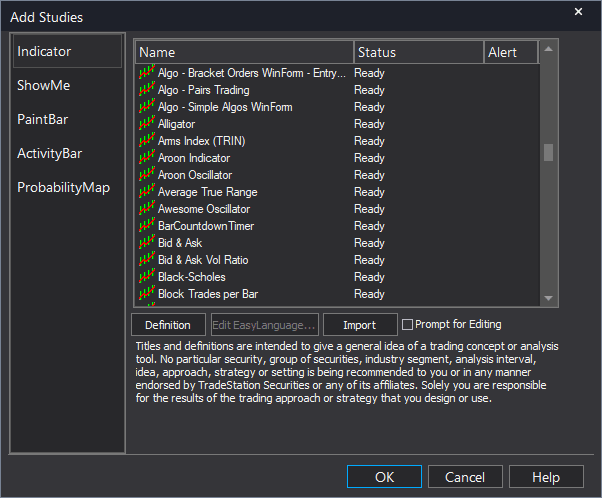
Step 7: Select the indicator
In the Add Studies dialog, make sure the Indicator tab is selected on the left side. Find "!IndHub-VolImbalance_Chart_v1" in the list, select it, and click OK to apply.
Step 8: Configure settings (optional)
Right-click anywhere on the chart, go to Studies > Edit Studies..., select the indicator, and click the Inputs tab. Key inputs: MinGapATR (default 0.1, minimum gap size as ATR multiple), RequireVolSpike (default false, volume filter), MaxAge (default 75, zone expiration in bars), MaxZones (default 10), ShowBullish/ShowBearish (toggle sides), ShowMidpoint (toggle midpoint line), BullColor/BearColor (zone colors). Most traders start with defaults.
Common Issues
I see very few Volume Imbalance zones compared to Fair Value Gaps. Is the indicator working?
Yes. Volume Imbalances are naturally rarer than Fair Value Gaps because they require consecutive candle bodies to not overlap — a more extreme condition than the 3-candle wick-to-wick FVG pattern. On liquid instruments with tight spreads, body-to-body gaps are uncommon during normal conditions and tend to appear only during high-momentum moves. This rarity is a feature — each zone carries more significance.
Zones disappear from my chart. Is the indicator repainting?
No, the indicator does not repaint. Zones are removed for two reasons: mitigation (price closed through the zone, filling it) or expiration (the zone exceeded MaxAge bars). Both are expected behavior. Increase MaxAge if you want zones to persist longer. Mitigated zones are always removed because the price level has been filled.
What is the difference between this and the Fair Value Gap indicator?
Fair Value Gaps use a 3-candle wick-to-wick pattern: the gap between candle 1's high/low and candle 3's low/high. Volume Imbalances use a 2-candle body-to-body pattern: the gap between one candle's close and the next candle's open. Volume Imbalances are rarer but more aggressive — the bodies themselves do not overlap, indicating price skipped those levels entirely. Many traders use both indicators together, with Volume Imbalances as higher-conviction zones within the broader FVG framework.
Should I enable RequireVolSpike? What does it add?
RequireVolSpike adds a volume confirmation filter. When enabled, the gap must be accompanied by above-average volume (default 1.5x the 20-bar average) to qualify. This filters out gaps caused by low-liquidity jumps (pre-market gaps, thin overnight moves) and focuses on gaps backed by genuine institutional participation. Enable it for the highest-conviction zones; leave it disabled to see all body-to-body gaps regardless of volume.
For additional help, contact support.