Market Structure Chart
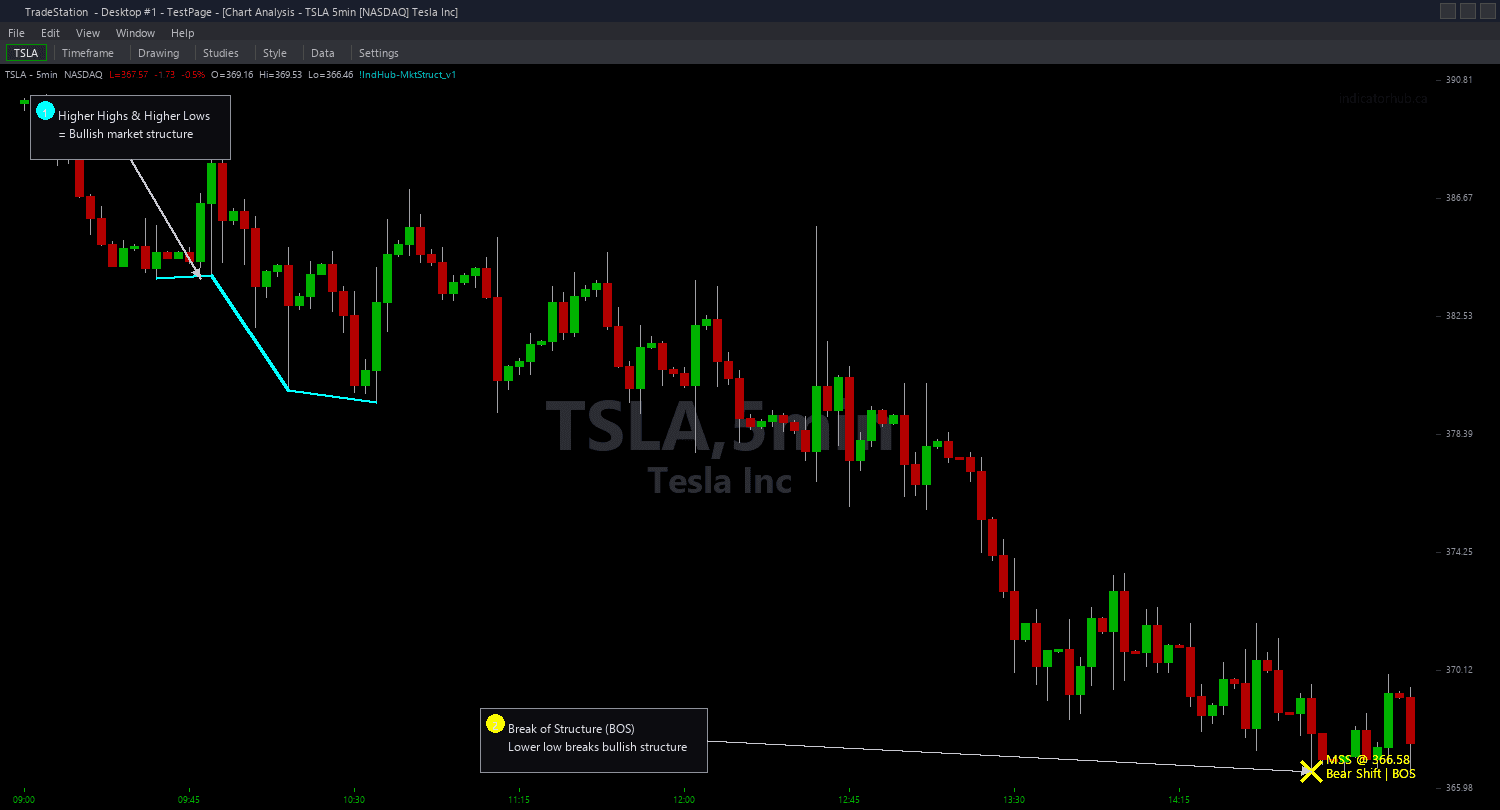
Market Structure Chart draws horizontal lines at the exact price levels where market structure breaks occur, with clear visual differentiation between reversals and continuations. MSS lines are drawn thick and solid to emphasize the significance of a trend reversal. BOS lines are drawn thin and dashed to indicate trend continuation. Color coding distinguishes bullish from bearish breaks.
- ●Green thick solid lines mark MSS bullish reversals — price broke above a key swing high against a previous downtrend, signaling smart money has shifted to buying
- ●Green thin dashed lines mark BOS bullish continuations — price broke above a swing high in the direction of an existing uptrend, confirming momentum
- ●Red thick solid lines mark MSS bearish reversals — price broke below a key swing low against a previous uptrend, signaling smart money has shifted to selling
- ●Red thin dashed lines mark BOS bearish continuations — price broke below a swing low in the direction of an existing downtrend, confirming weakness
- ●SwingStrength (default 5) controls pivot sensitivity — higher values detect only the most significant structural breaks
- ●MaxLevels (default 10) limits simultaneous break lines to keep the chart focused
- ●MaxAge (default 75 bars) expires old break lines that are no longer relevant to current structure
- ●ShowBOS (default true) toggles display of continuation break lines — set to false to show only MSS reversals for a cleaner chart
- ●ShowMSS (default true) toggles display of reversal break lines
- ●Plot1 outputs the signal value: +2 (MSS bull), +1 (BOS bull), -1 (BOS bear), -2 (MSS bear), 0 (no break)
The most actionable signals are MSS events. When a thick solid green line appears, the market structure has shifted from bearish to bullish — look for long entries on pullbacks. When a thick solid red line appears, structure has shifted from bullish to bearish — look for short entries on rallies. BOS lines confirm the trend is continuing and can be used as trailing reference levels.
All break detection uses completed bar data only. Non-repainting guaranteed.
30-Day Money-Back Guarantee
Try it risk-free. Not satisfied? Full refund, no questions asked.
Part of the Market Structure Bundle
Get all 4 study types for $65 — save $30
Who This Is For
Market Structure Chart is built for ICT and SMC traders who use market structure breaks as the foundation of their directional analysis. If you manually identify where price breaks above a swing high in a downtrend (MSS) or below a swing low in an uptrend (MSS), this indicator automates that detection with objective pivot-based logic.
Use it on intraday charts (5-minute to 15-minute) for day trading trend reversals and continuation setups. The default SwingStrength of 5 works well for 5-minute charts on liquid instruments. For swing trading on 1-hour or daily charts, increase SwingStrength to 8-10 for higher-significance structural breaks.
The indicator performs best on markets with clean trending structure: index futures (ES, NQ, YM), NASDAQ-100 stocks, major forex pairs, and trending crypto assets. Choppy, range-bound markets will produce frequent alternating MSS signals — in those conditions, reduce SwingStrength or use higher timeframes.
When you see an MSS signal (thick line), treat it as a trend change until the next MSS fires in the opposite direction. Between MSS events, BOS signals confirm the trend direction. Use MSS for entries and BOS for adding to positions or trailing stops.
See It in Action
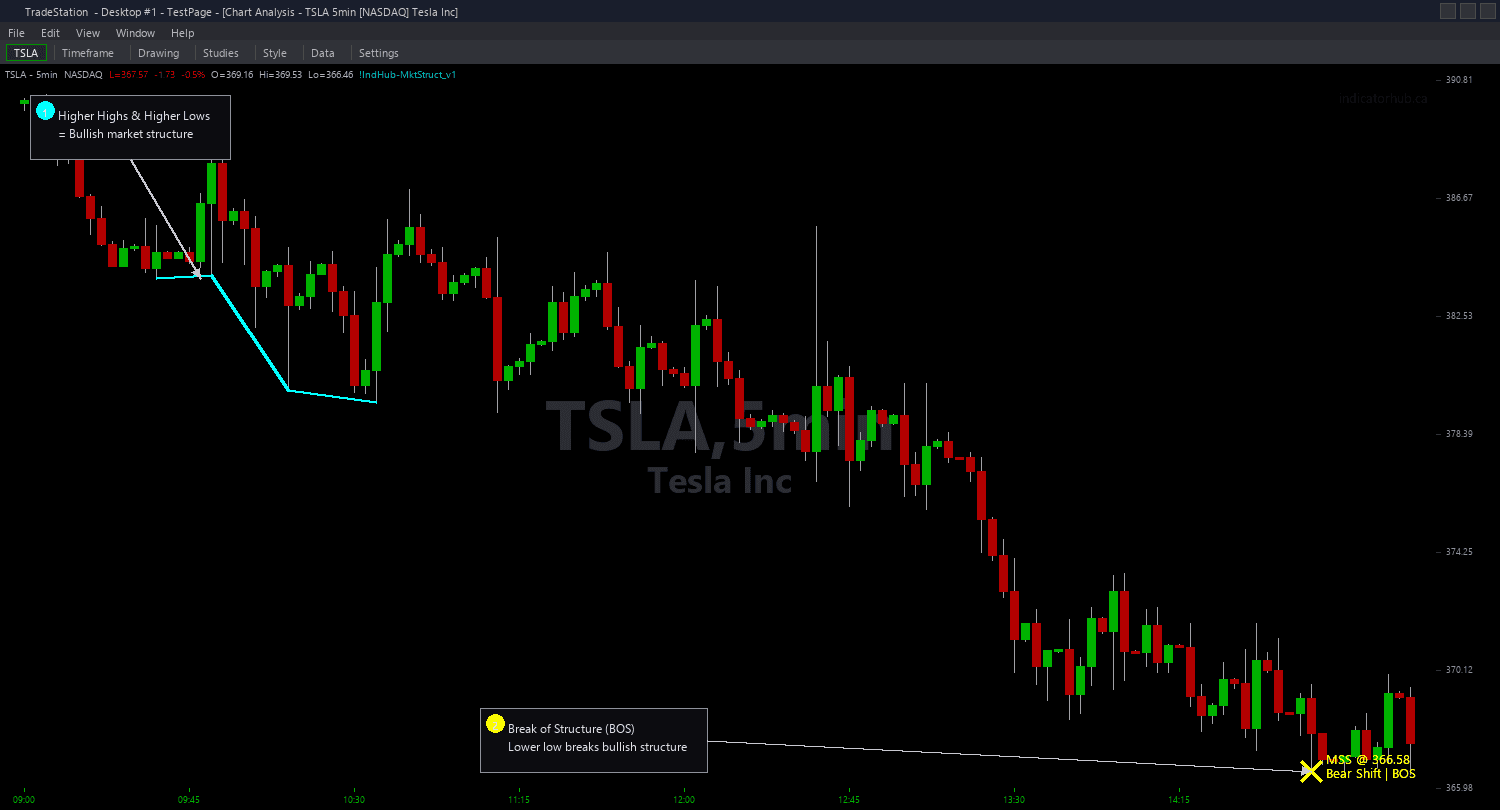
Example chart showing Market Structure Chart on a live trading session
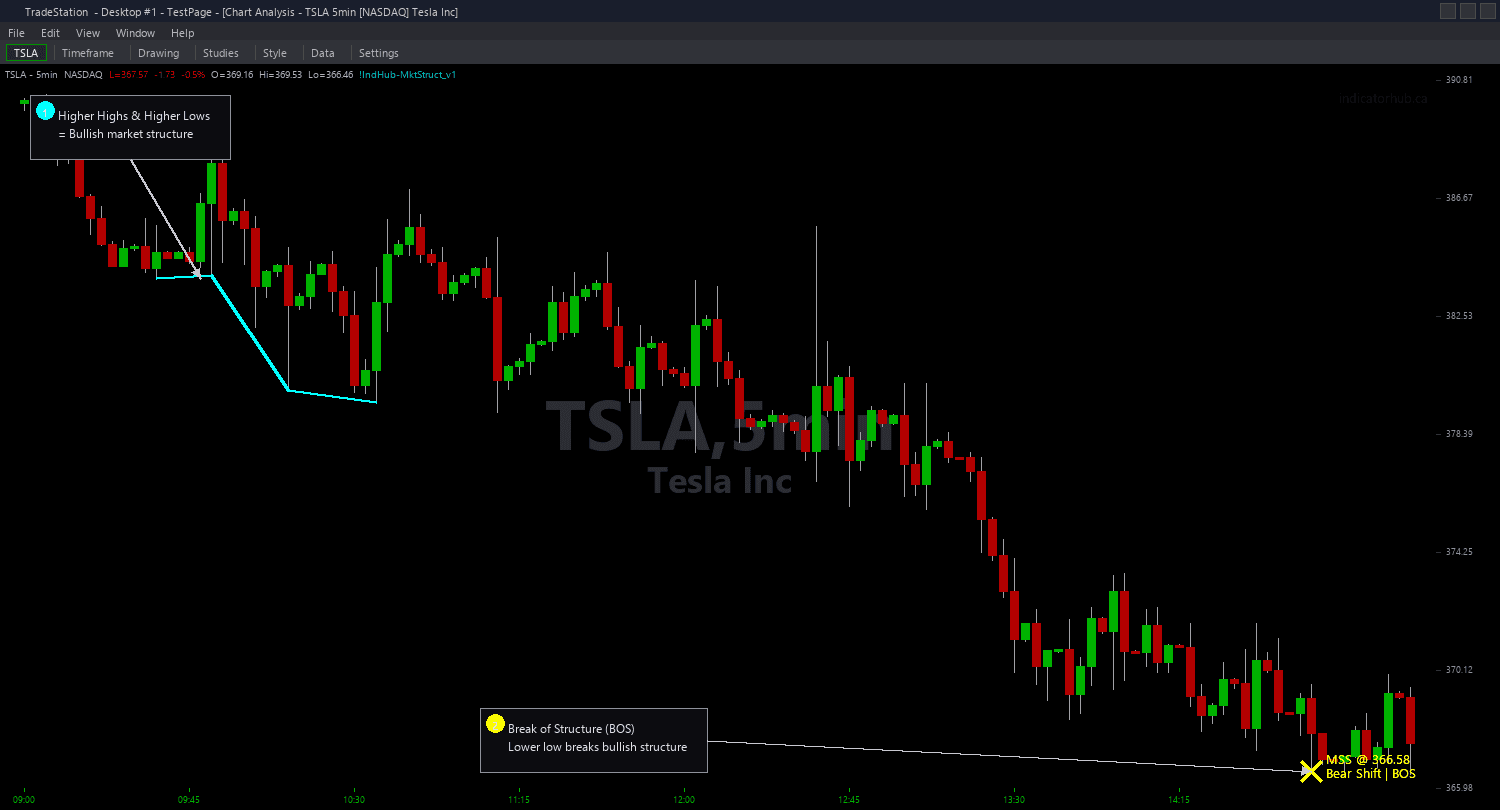
Example chart showing Market Structure Chart on a live trading session
Installation Guide
Step 1: Download the indicator file
After purchasing, you will receive a download link via email. Click the link and save the market-structure-chart.eld file to your computer. Save it somewhere easy to find like your Desktop or Downloads folder.
Step 2: Open the Import Wizard
Open TradeStation. Click the File menu in the top-left corner, then select Import/Export EasyLanguage to launch the Import/Export Wizard.
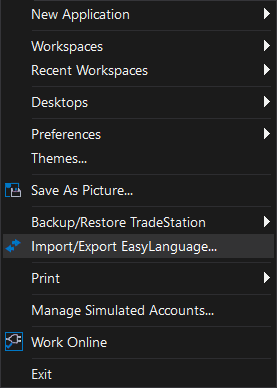
Step 3: Select the import type
In the Import/Export Wizard, select "Import EasyLanguage file (ELD, ELS or ELA)" from the list. Click Next to continue.
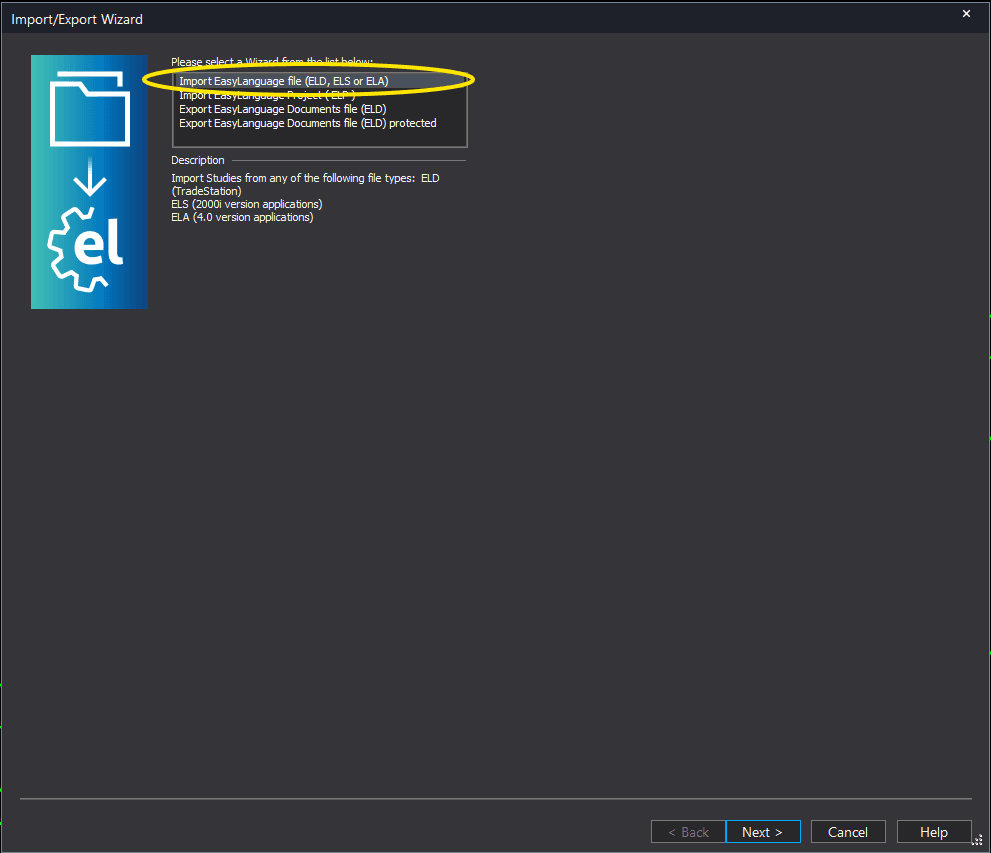
Step 4: Browse for the file
Click the Browse button to open a file browser where you can locate your downloaded .ELD file.
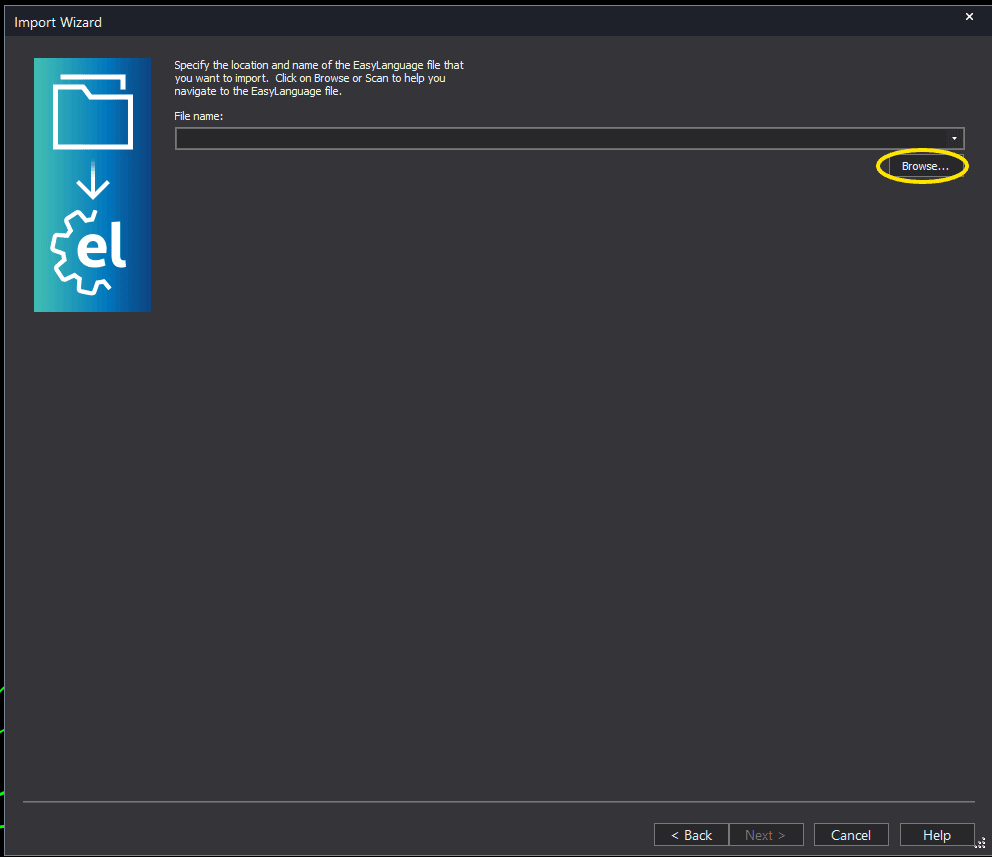
Step 5: Select and open the file
Navigate to the folder where you saved the .ELD file. Select market-structure-chart.eld and click Open. The file name shown may differ from the screenshot — look for your downloaded indicator file.
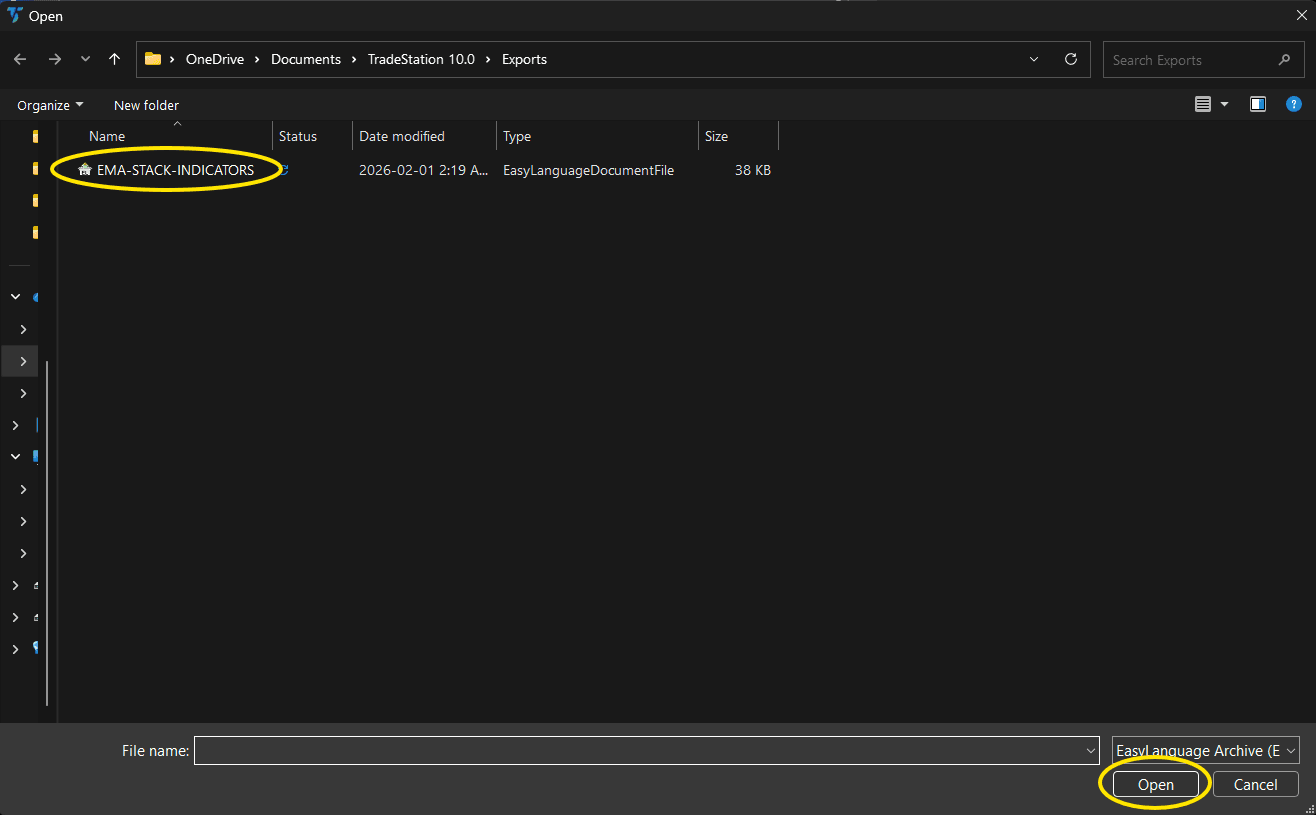
Step 6: Open the Studies menu
On your chart, click the Studies dropdown in the toolbar and select Add Study.
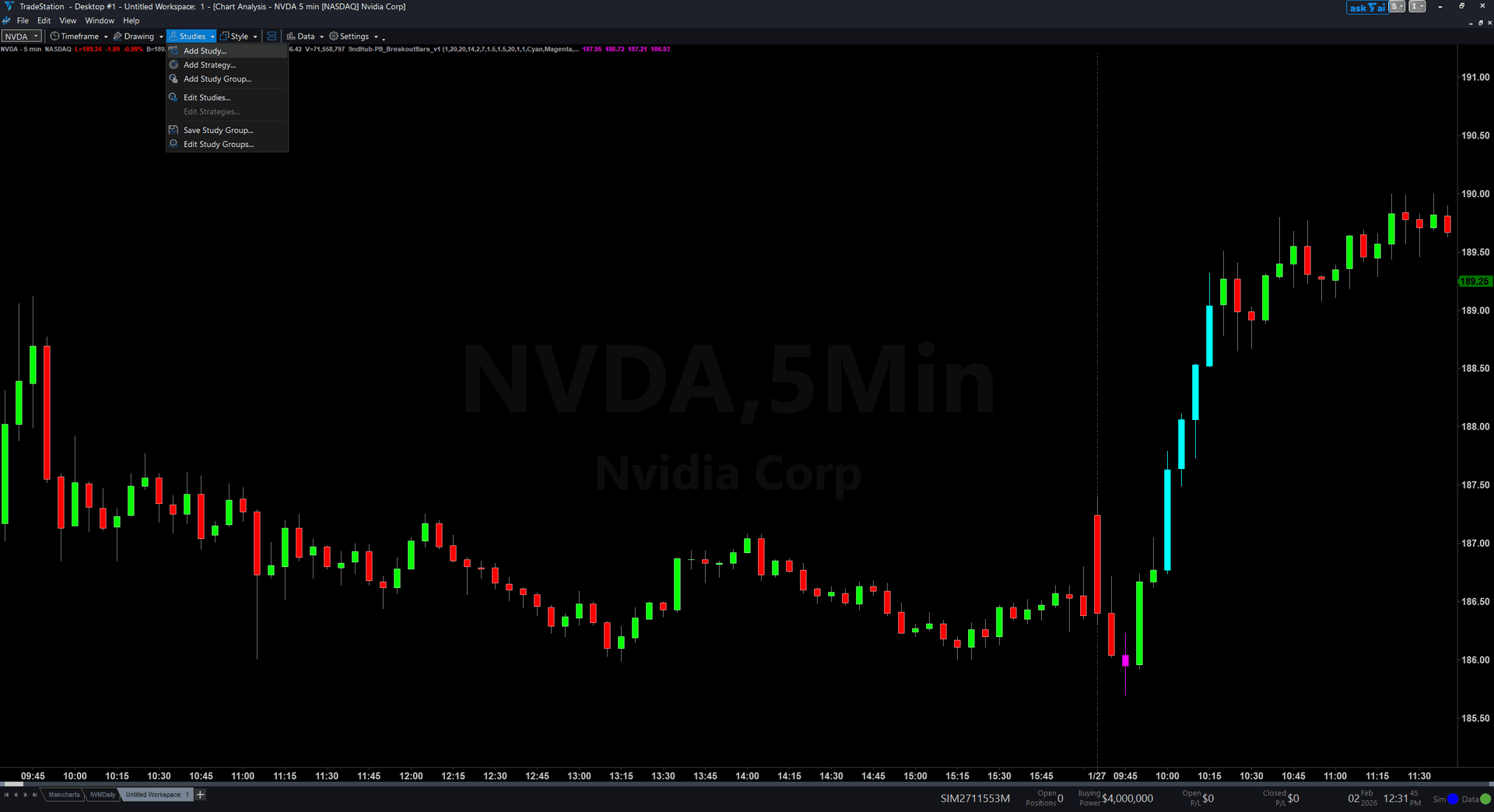
Step 7: Select the indicator
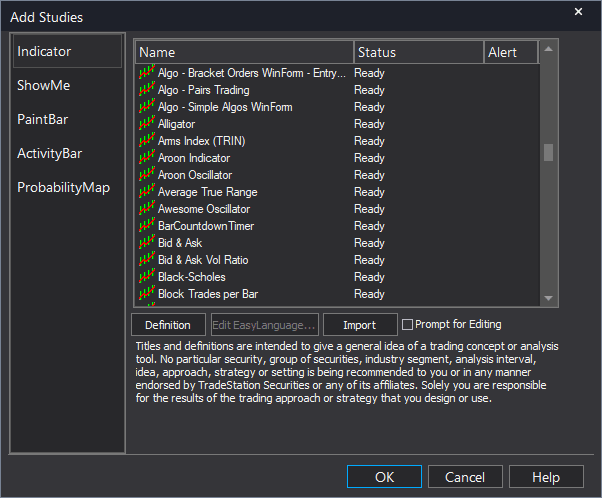
In the Add Studies dialog, make sure the Indicator tab is selected on the left side. Find "!IndHub-MktStructure_Chart_v1" in the list, select it, and click OK to apply.
Step 8: Configure settings (optional)
Right-click anywhere on the chart, go to Studies > Edit Studies..., select the indicator, and click the Inputs tab. Key inputs: SwingStrength (default 5, pivot sensitivity), MaxLevels (default 10), MaxAge (default 75, break line expiration), ShowBOS (default true, toggle continuation breaks), ShowMSS (default true, toggle reversal breaks). For a cleaner chart showing only reversals, set ShowBOS to false.
Common Issues
I see MSS signals alternating rapidly between bullish and bearish. Is the indicator broken?
No. Rapid alternating MSS signals indicate a choppy, range-bound market where price is breaking swing levels in both directions without establishing a sustained trend. This is valuable information — it tells you the market lacks directional conviction and you should either step aside or reduce position size. Increase SwingStrength to 8 or 10 to require more significant pivots, which will reduce the frequency of alternating signals in choppy conditions.
What is the difference between MSS and BOS? When should I trade each?
MSS (Market Structure Shift) occurs when price breaks a swing level AGAINST the prevailing trend — this signals a reversal. BOS (Break of Structure) occurs when price breaks a swing level IN the direction of the existing trend — this confirms continuation. Trade MSS for reversal entries (higher risk, higher reward). Trade BOS for trend continuation entries (lower risk, adding to winners). MSS changes your bias; BOS confirms it.
Can I hide BOS lines and show only MSS for reversal trading?
Yes. Set ShowBOS to false in the indicator inputs. Only MSS reversal lines (thick solid) will appear on your chart. This gives you a clean view focused exclusively on trend change signals. You can also set ShowMSS to false and ShowBOS to true if you only want continuation signals.
The break lines expire and disappear. Can I keep them longer?
Yes. Increase MaxAge from the default 75 to 150 or 200. This keeps break lines visible for longer, which is useful for seeing the history of structural breaks over a wider timeframe. Be aware that very old break lines may clutter the chart — find a balance between history and clarity based on your trading style.
For additional help, contact support.