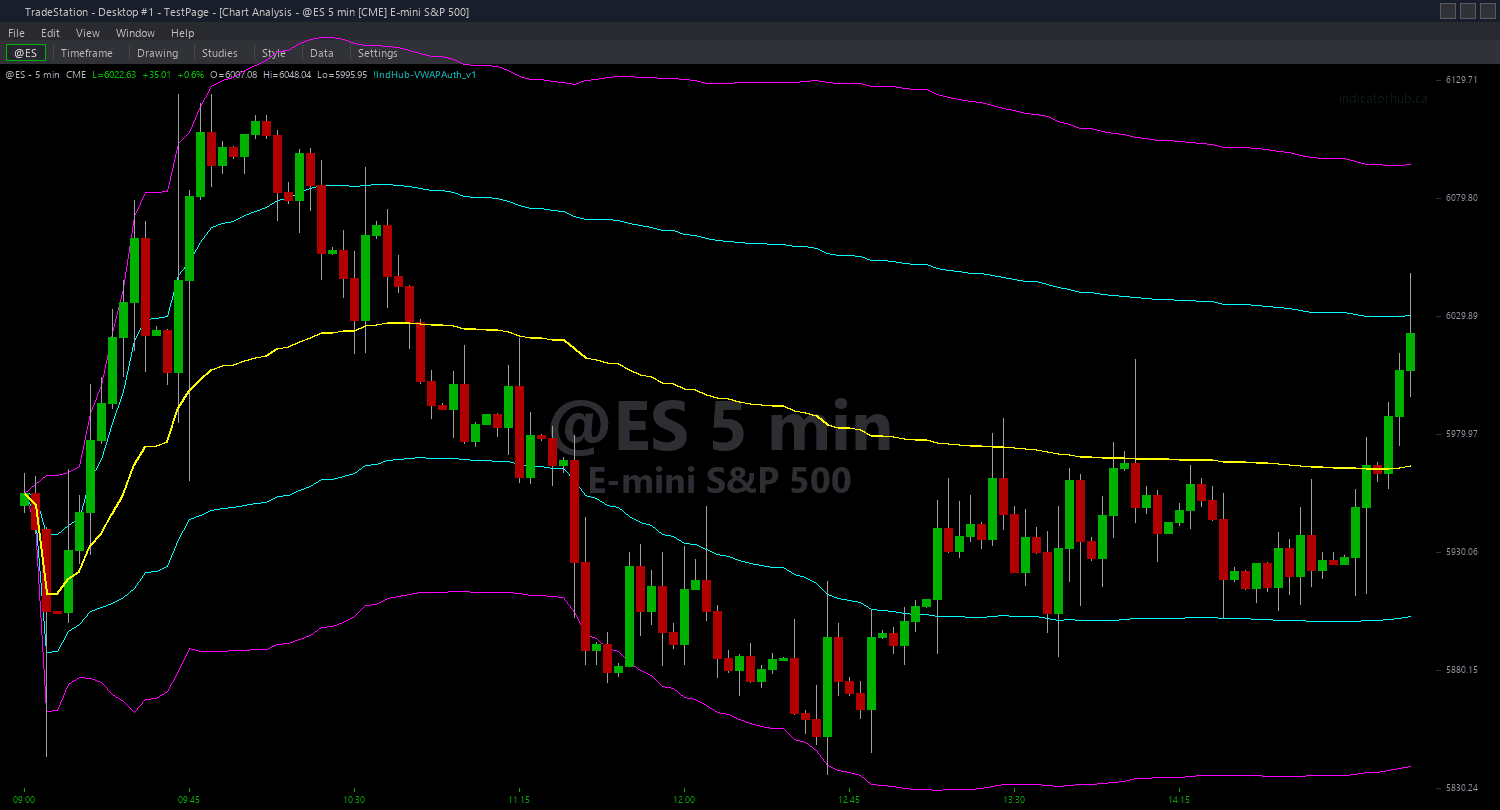
VWAP Authority trading indicator interface

VWAP Authority

Works with TradeStation
$69
One-time purchase

VWAP Authority gives you the same institutional edge that big money uses by showing the volume-weighted average price with two sets of standard deviation bands. When you know where VWAP is and whether price is being accepted or rejected around it, you can trade with the same reference point that institutional traders and automated systems rely on.

  • The yellow VWAP line is your institutional fairness level, with bulls in control above and bears below
  • Cyan Sigma 1 bands mark normal price extension where about 68 percent of price action stays during normal conditions
  • Magenta Sigma 2 bands mark extreme extension where only 5 percent of price action reaches, creating high-probability reversal zones
  • The reclaim alert fires when price crosses back above VWAP after spending at least 10 bars below it, signaling a bullish shift
  • The rejection alert fires when price touches upper Sigma 2 but closes back below Sigma 1, signaling overextension
  • Anchor VWAP to daily, weekly, or monthly sessions depending on your trading style

Use the reclaim signal to enter when sentiment shifts and the rejection signal to fade overextended moves. When price is above VWAP, look for long setups. When price is below VWAP, look for short setups. Sigma 2 touches typically result in pullbacks back toward VWAP unless the move is exceptionally strong.

Every calculation is guaranteed non-repainting using confirmed bar data only, so you can trust your signals and backtest with confidence.

Secure checkout powered by Stripe. No account required.

Who This Is For

VWAP Authority is built for active intraday traders and swing traders who want to align with institutional flow and trade around the real fair value anchor that big money uses. If you have been frustrated by arbitrary moving averages that do not reflect actual volume distribution, VWAP gives you the institutional standard.

Use it during active market hours on the timeframes you trade. Day traders watch for VWAP reclaims and Sigma 2 rejections in real time. Swing traders check VWAP daily to confirm trend direction and plan entries near deviation bands.

VWAP is most powerful on intraday charts where volume data is accurate and meaningful. Use 1-minute to 15-minute charts for scalping and day trading. Use 1-hour and 4-hour charts for swing trading context. Works best on liquid markets with high volume transparency: index futures like ES and NQ, large-cap stocks, and major ETFs. Avoid using VWAP on forex pairs or thin stocks where volume data is unreliable.

Set your anchor period (daily for day trading, weekly for swing trading). Trade in the direction of VWAP (long above, short below). Use Sigma 2 touches as reversal zones. When the reclaim alert fires, watch for confirmation and enter long.

See It in Action

VWAP Authority example chart 1 showing indicator signals

Example chart showing VWAP Authority on a live trading session

VWAP Authority example chart 2 showing indicator signals

Example chart showing VWAP Authority on a live trading session

Installation Guide

Step 1: Download the indicator file

After purchasing, you will receive a download link via email. Click the link and save the VWAP_Authority.ELD file to your computer. This file contains the complete indicator ready to import into TradeStation.

Step 2: Import into TradeStation

Open TradeStation and go to File > Import > EasyLanguage. In the import dialog, click Browse and navigate to the location where you saved the VWAP_Authority.ELD file. Select the file and click Open. TradeStation will confirm the import was successful. Click OK.

TradeStation installation step 2: Import into TradeStation

Step 3: Apply to your chart

Open any chart in TradeStation. Right-click on the chart and select Insert Analysis Technique. In the list of indicators, search for "VWAP Authority" and select it. Click OK to apply. The indicator will draw the VWAP line and standard deviation bands directly on your price chart as colored lines overlaying price bars.

Step 4: Configure settings (optional)

Right-click the indicator name in the chart legend and select Format [IndicatorName]. On the Inputs tab, you can customize: AnchorPeriod (default 1): Choose when VWAP resets. 1 = Daily (new VWAP each trading day), 2 = Weekly (resets each Monday), 3 = Monthly (resets first trading day of month). Sigma1Mult (default 1.0): Multiplier for first standard deviation bands. Standard is 1.0 for true one-sigma bands. Sigma2Mult (default 2.0): Multiplier for second standard deviation bands. Standard is 2.0 for true two-sigma bands. ReclaimBarsBelow (default 10): Minimum consecutive bars price must stay below VWAP before a reclaim signal fires. Higher values reduce false signals but delay alerts. AlertOnReclaim (default true): Enable audio alert when price reclaims VWAP after extended time below. AlertOnRejection (default true): Enable audio alert when price touches Sigma 2 Upper but closes back below Sigma 1 Upper. Click OK to save your changes. The indicator will refresh with your chosen settings.

Full Color Customization

Every indicator ships with a professional dark color palette designed for extended trading sessions. But your workspace is yours — so we include a complete RGB Color Guide with every purchase that goes far beyond TradeStation's built-in color picker.

5 Ready-Made Palettes

Swap the entire look in minutes. Choose from Midnight Blue, Earth Tones, Neon Subdued, Grayscale, or Monochrome Green — each palette is tested for readability and eye comfort during long sessions.

70+ Individual Colors

Mix and match from a curated library of dark-optimized colors across greens, reds, blues, ambers, magentas, and neutrals. Every value is pre-tested to keep text readable on dark backgrounds.

Color Mixing Guide

Learn the RGB system with simple rules for making colors darker, warmer, cooler, or more muted. Build your own signature palette that matches your charts and workspace.

Copy-Paste Ready

Every color comes with the exact RGB code you need. Copy the value, paste it into the indicator source, done. No guessing, no trial and error.

Download RGB Color Guide

Included free with every indicator purchase

Common Issues

The VWAP line jumps at the start of each day. Is this normal?

Yes. When using daily anchored VWAP (AnchorPeriod = 1), VWAP resets to the opening price at the start of each trading session. This is correct behavior. VWAP is a session-based measure, not a continuous rolling average. If you want a smoother VWAP that persists across days, change AnchorPeriod to 2 (weekly) or 3 (monthly).

On my forex chart, the standard deviation bands look erratic. Why?

Forex spot markets do not have centralized volume data. TradeStation uses tick count as a volume proxy for forex, which does not accurately represent true traded volume. VWAP is most reliable on markets with real volume data like stocks and futures. For forex trading, consider using other indicators designed for price action without volume dependency.

I keep getting reclaim alerts but price immediately falls back below VWAP. How do I reduce false signals?

Increase the ReclaimBarsBelow setting to 15 or 20 bars. This requires price to stay below VWAP for longer before a reclaim alert fires, filtering out quick whipsaw moves. You can also use the reclaim alert as a heads-up to watch the chart rather than an automatic entry signal. Wait for additional confirmation like a bullish reversal pattern or volume surge before entering.

Can I change the band colors to match my chart theme?

Yes. Right-click the indicator name and select Format [IndicatorName]. Go to the Plots tab. You will see five plot lines: VWAP, S1 Upper, S1 Lower, S2 Upper, and S2 Lower. Select each one and click the color box to choose your preferred color. Click OK to apply. Common choices are white or gray for VWAP, light blue for Sigma 1 bands, and orange or purple for Sigma 2 bands.

The Sigma 2 bands are very far from price. Is the indicator calculating correctly?

Yes. When a market is trending strongly with high volume, standard deviation bands widen significantly. This is mathematically correct and reflects genuine price dispersion. If the bands seem too wide for your strategy, you can reduce Sigma2Mult to 1.5 to bring the outer bands closer to price. However, be aware this changes the statistical meaning: the bands will no longer represent true two-sigma levels.

For additional help, contact support.

← Back to Indicator Library