RSI Premium
RSI Premium solves the biggest problem with standard RSI: overbought and oversold levels that constantly fail in strong trends. It replaces static 70/30 levels with dynamic adaptive zones that adjust to market conditions, and adds guaranteed non-repainting divergence signals that catch reversals before they happen.
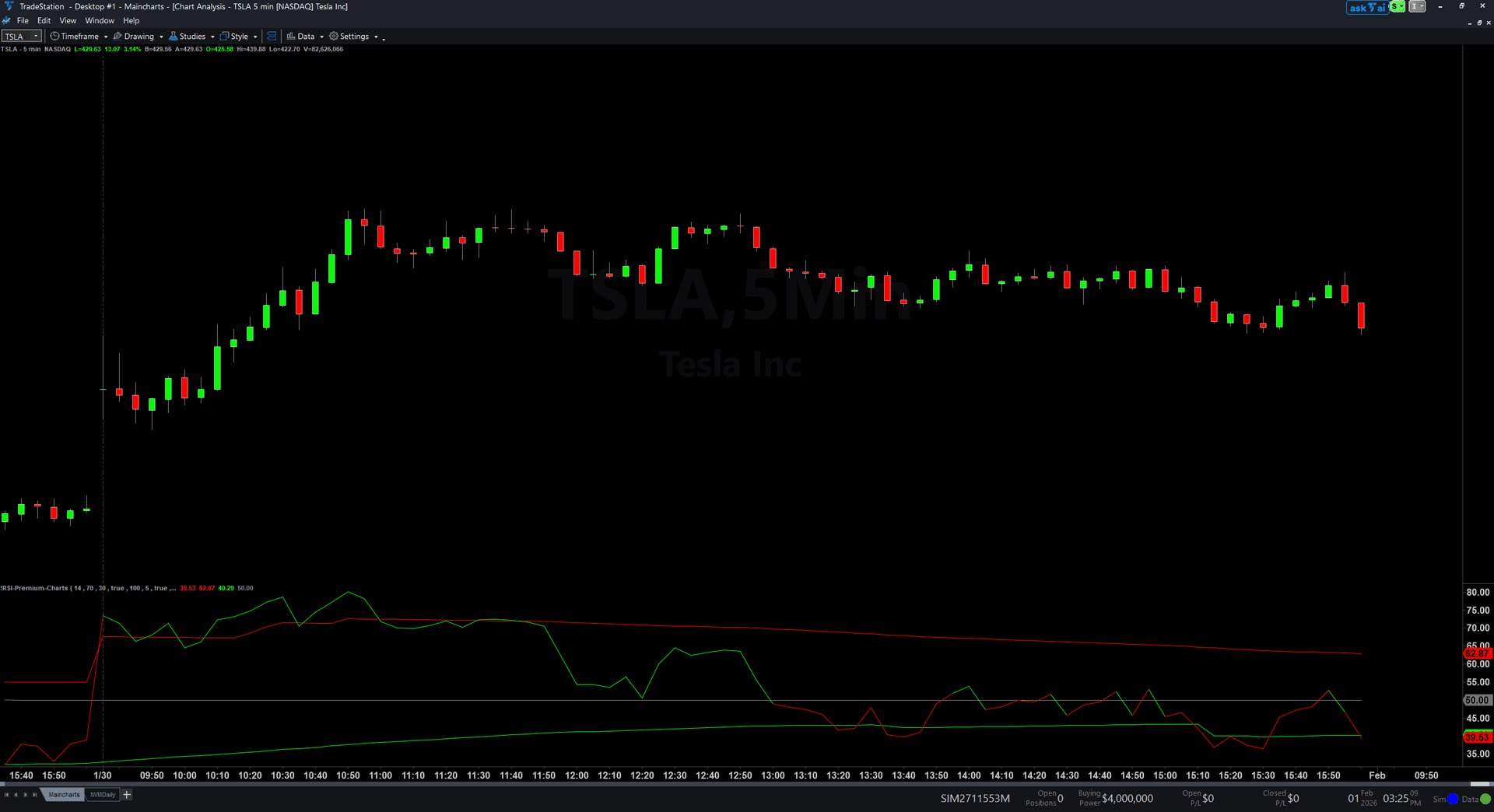
- ●The RSI line changes color at the 50 midline: green for bullish momentum, red for bearish momentum
- ●Dynamic overbought/oversold zones adapt every bar based on the last 100 bars of RSI behavior, tightening during consolidations and expanding during trends
- ●Bullish divergence detection spots when price makes a lower low but RSI makes a higher low, signaling weakening selling pressure
- ●Bearish divergence detection spots when price makes a higher high but RSI makes a lower high, signaling weakening buying pressure
- ●Every divergence is marked with a colored dot at the exact pivot point with audio alerts so you catch setups without staring at charts
- ●The subgraph layout keeps RSI line, zone levels, midline, and divergence markers organized below your price chart
The dynamic zones keep you out of bad counter-trend trades. In a strong uptrend where RSI stays elevated, the oversold zone moves higher so you do not get false buy signals. In a strong downtrend, the overbought zone moves lower so you do not get false sell signals. Divergence signals use confirmed swing pivots with a 5-bar strength requirement, appearing only after full confirmation.
Every signal is guaranteed non-repainting. Divergence dots only appear after the swing pivot is fully confirmed, so they will never disappear or move retroactively.
Secure checkout powered by Stripe. No account required.
Who This Is For
RSI Premium is built for swing traders and position traders who want to catch reversals early with objective divergence signals instead of guessing when momentum has truly shifted. If you have been frustrated by false RSI signals in trending markets, or if you want to spot divergences without manually comparing price and indicator pivots, this indicator automates the entire process.
Use it for planning reversal trades and confirming trend exhaustion. When a divergence signal appears, wait for price confirmation like a reversal candlestick pattern or a break of a short-term trendline before entering. Do not trade divergences in isolation. Use them as high-probability alerts that require additional confirmation.
Works on any timeframe, but divergences are most reliable on higher timeframes where swing pivots represent meaningful market structure. Use 1-hour and 4-hour charts for day trading and swing trading. Use daily and weekly charts for position trading. Most effective on liquid trending markets: index futures, large-cap stocks, major forex pairs, and established cryptocurrencies.
Watch for divergence dots to appear. Green dot at an RSI low signals potential bullish reversal. Red dot at an RSI high signals potential bearish reversal. Confirm with price action, then enter in the direction of the divergence with your stop beyond the swing pivot.
See It in Action

Example chart showing RSI Premium on a live trading session

Example chart showing RSI Premium on a live trading session
Installation Guide
Step 1: Download the indicator file
After purchasing, you will receive a download link via email. Click the link and save the RSI_Premium.ELD file to your computer. This file contains the complete indicator ready to import into TradeStation.
Step 2: Import into TradeStation
Open TradeStation and go to File > Import > EasyLanguage. In the import dialog, click Browse and navigate to the location where you saved the RSI_Premium.ELD file. Select the file and click Open. TradeStation will confirm the import was successful. Click OK.
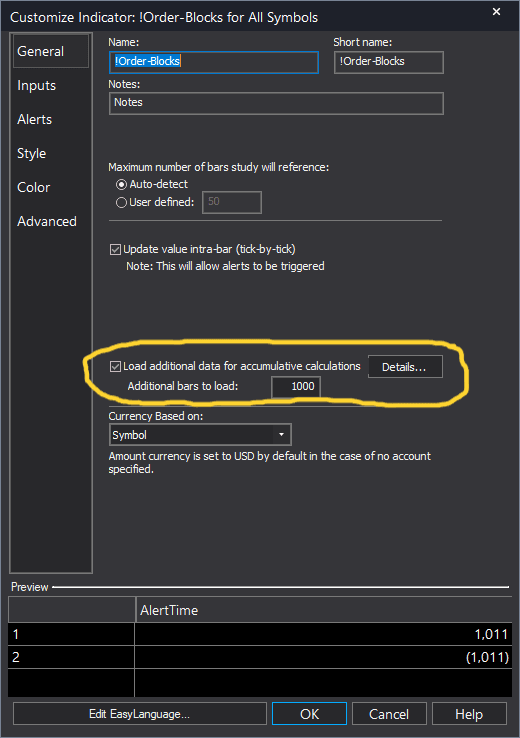
Step 3: Apply to your chart
Open any chart in TradeStation. Right-click on the chart and select Insert Analysis Technique. In the list of indicators, search for "RSI Premium" and select it. Click OK to apply. The indicator will appear in a subgraph below your price chart showing the RSI line, zone levels, midline, and divergence markers.
Step 4: Configure settings (optional)
Right-click the indicator name in the subgraph area and select Format [IndicatorName]. On the Inputs tab, you can customize: RSILength (default 14): Number of bars for RSI calculation. Standard is 14. Use 9 for faster response, 21 for smoother signals. OBLevel (default 70): Static overbought level used when dynamic zones are disabled. OSLevel (default 30): Static oversold level used when dynamic zones are disabled. UseDynamicZones (default true): Enable adaptive overbought/oversold zones. Set to false to use static OBLevel and OSLevel values. DynLookback (default 100): Number of bars to analyze for dynamic zone calculation. Higher values make zones slower to adapt. SwingStrength (default 5): Number of bars on each side required to confirm a swing pivot for divergence detection. Higher values find stronger divergences but fewer signals. ShowDivergences (default true): Enable divergence markers. Set to false to hide divergence dots and use only the RSI line and zones. AlertOnBullDiv (default true): Enable audio alert when bullish divergence is detected. AlertOnBearDiv (default true): Enable audio alert when bearish divergence is detected. Click OK to save your changes. The indicator will refresh with your chosen settings.
Full Color Customization
Every indicator ships with a professional dark color palette designed for extended trading sessions. But your workspace is yours — so we include a complete RGB Color Guide with every purchase that goes far beyond TradeStation's built-in color picker.
5 Ready-Made Palettes
Swap the entire look in minutes. Choose from Midnight Blue, Earth Tones, Neon Subdued, Grayscale, or Monochrome Green — each palette is tested for readability and eye comfort during long sessions.
70+ Individual Colors
Mix and match from a curated library of dark-optimized colors across greens, reds, blues, ambers, magentas, and neutrals. Every value is pre-tested to keep text readable on dark backgrounds.
Color Mixing Guide
Learn the RGB system with simple rules for making colors darker, warmer, cooler, or more muted. Build your own signature palette that matches your charts and workspace.
Copy-Paste Ready
Every color comes with the exact RGB code you need. Copy the value, paste it into the indicator source, done. No guessing, no trial and error.
Included free with every indicator purchase
Common Issues
I see RSI hitting the overbought zone but price keeps trending higher. Is the indicator wrong?
No. Overbought does not mean price must reverse immediately. In strong uptrends, RSI can remain in overbought territory for extended periods. This is why RSI Premium includes dynamic zones: they expand during trends to avoid false signals. Use divergences as your reversal signals, not simple overbought/oversold touches. An overbought reading without a bearish divergence is not a sell signal.
The divergence dots appear several bars after the actual swing pivot. Why the delay?
This is intentional and guarantees non-repainting. A swing pivot is only confirmed after SwingStrength bars have elapsed on both sides. With the default setting of 5, the divergence dot appears 5 bars after the actual pivot low or high. This delay ensures the signal never disappears or moves. If you want faster signals, reduce SwingStrength to 3, but be aware you will get more false signals on minor pivots.
Can I disable the dynamic zones and use traditional 70/30 levels?
Yes. Set UseDynamicZones to false. The indicator will then use the static OBLevel and OSLevel values you specify. This gives you the classic RSI behavior if you prefer traditional levels, while still providing non-repainting divergence detection.
I am seeing divergence signals but price does not reverse. Are the signals unreliable?
Divergences are high-probability setups, not guaranteed reversals. Always wait for price confirmation before entering a trade. A bullish divergence tells you selling pressure is weakening, but you still need price to confirm with a higher low, bullish engulfing pattern, or trendline break. Divergences work best when combined with support/resistance levels, candlestick patterns, and volume analysis.
The divergence dots are hard to see. Can I make them larger?
The divergence dots use the default plot point size in TradeStation. You can increase visibility by changing the plot width. Right-click the indicator name and select Format [IndicatorName]. Go to the Plots tab. Select "BullDiv" and increase the width to 5 or 7. Do the same for "BearDiv". Click OK. The divergence markers will now appear larger and easier to spot.
For additional help, contact support.