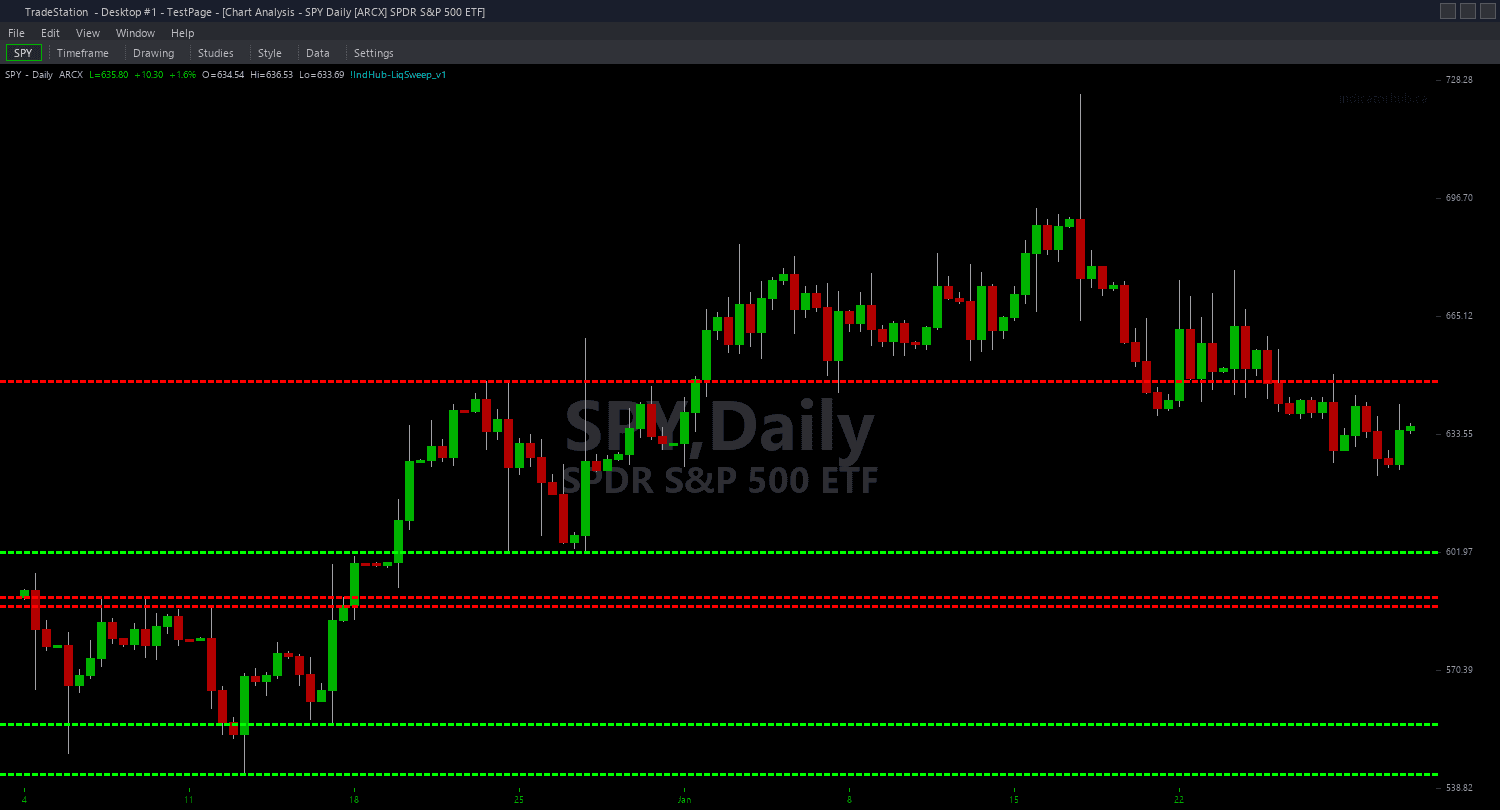
Liquidity Sweep ShowMe
Liquidity Sweep ShowMe marks the exact bars where liquidity sweeps occur and annotates each signal with quality metrics that help you assess whether the stop hunt has genuine institutional conviction. Green dots mark bullish sweeps (wick below swing low, close above). Red dots mark bearish sweeps (wick above swing high, close below). Each dot can include text labels showing sweep depth, volume comparison, and level age.
- ●Green dots ABOVE the bar mark bullish liquidity sweeps — stop orders below a swing low were triggered, then price reversed back inside the range
- ●Red dots BELOW the bar mark bearish liquidity sweeps — stop orders above a swing high were triggered, then price reversed back inside the range
- ●Depth label shows how far the wick penetrated beyond the swept level as an ATR multiple — 0.3+ ATR is a strong sweep
- ●Volume label shows the sweep bar's volume relative to the 20-bar average — positive percentages indicate above-average participation
- ●Age label shows how many bars the level existed before being swept — older levels accumulate more stops and produce stronger reversals
- ●DotOffset (default 0.3 ATR) positions markers clear of price bars for readability
- ●ShowLabels (default true) toggles the text annotations on or off for a cleaner view
The highest-quality sweeps combine deep penetration (Depth 0.3+ ATR), high volume (Vol +50%+), and an aged level (Age 20+ bars). When all three metrics are strong, the stop hunt was significant and the reversal is most likely to follow through.
All signals are guaranteed non-repainting. Once a dot and label plot on a completed bar, they stay.
30-Day Money-Back Guarantee
Try it risk-free. Not satisfied? Full refund, no questions asked.
Part of the Liquidity Sweep Bundle
Get all 4 study types for $65 — save $30
Who This Is For
Liquidity Sweep ShowMe is designed for traders who want objective, data-driven assessment of each sweep signal. Instead of guessing whether a sweep was genuine, you get immediate quality metrics that quantify the stop hunt's depth, volume, and level maturity.
Layer this study on top of the Liquidity Sweep chart indicator. The chart indicator shows tracked levels and their transformation from dashed to solid when swept. The ShowMe adds dots with quality data at each sweep point for decision-making.
Use it on 1-minute to 15-minute charts for intraday sweep trading. When a dot appears, check the three metrics: deep penetration with high volume at an aged level is your highest-conviction setup. Shallow sweeps with low volume are noise. Enter in the direction of the reversal with your stop just beyond the sweep wick's extreme.
Works best on liquid markets with genuine stop-hunt dynamics: index futures, major forex pairs, NASDAQ-100 stocks, and high-volume crypto. Thin markets may produce wick noise that resembles sweeps without institutional intent.
See It in Action
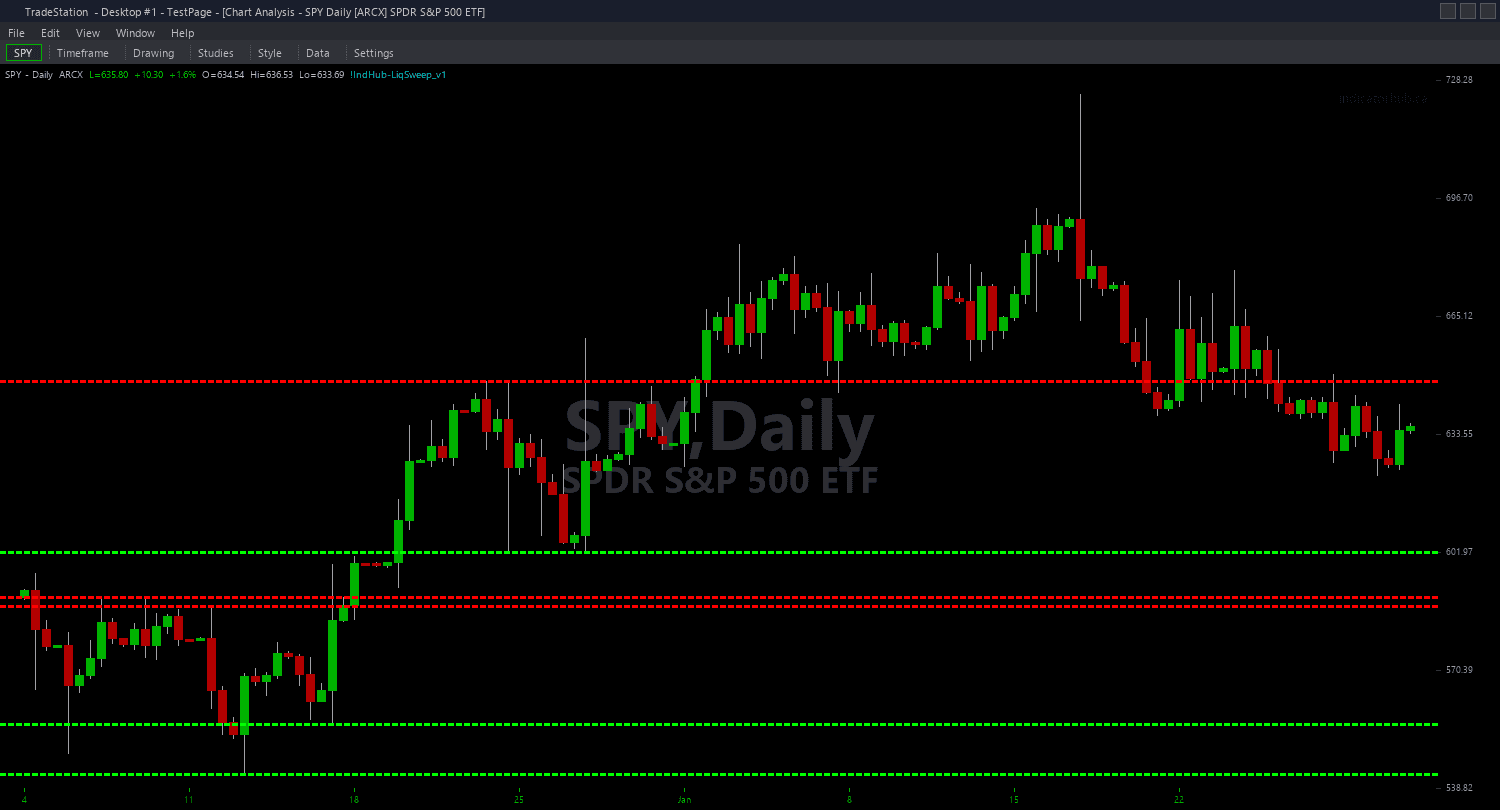
Example chart showing Liquidity Sweep ShowMe on a live trading session
Installation Guide
Step 1: Download the indicator file
After purchasing, you will receive a download link via email. Click the link and save the liquidity-sweep-showme.eld file to your computer. Save it somewhere easy to find like your Desktop or Downloads folder.
Step 2: Open the Import Wizard
Open TradeStation. Click the File menu in the top-left corner, then select Import/Export EasyLanguage to launch the Import/Export Wizard.
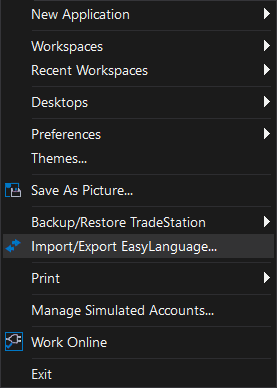
Step 3: Select the import type
In the Import/Export Wizard, select "Import EasyLanguage file (ELD, ELS or ELA)" from the list. Click Next to continue.
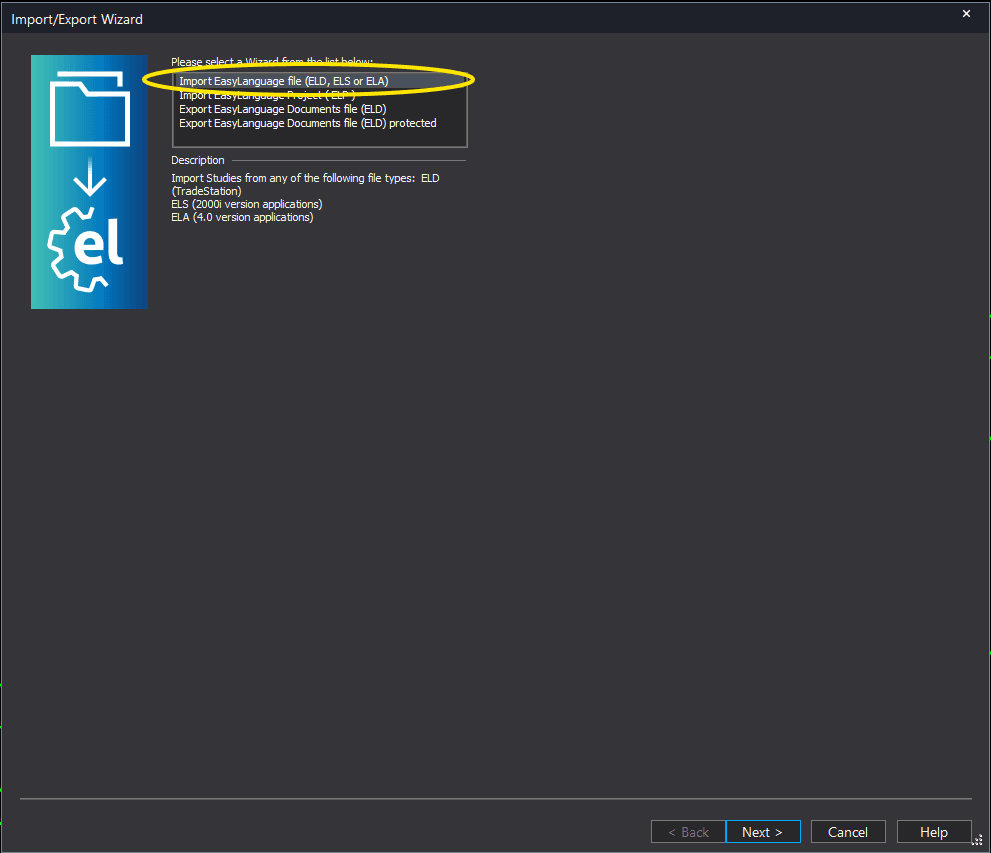
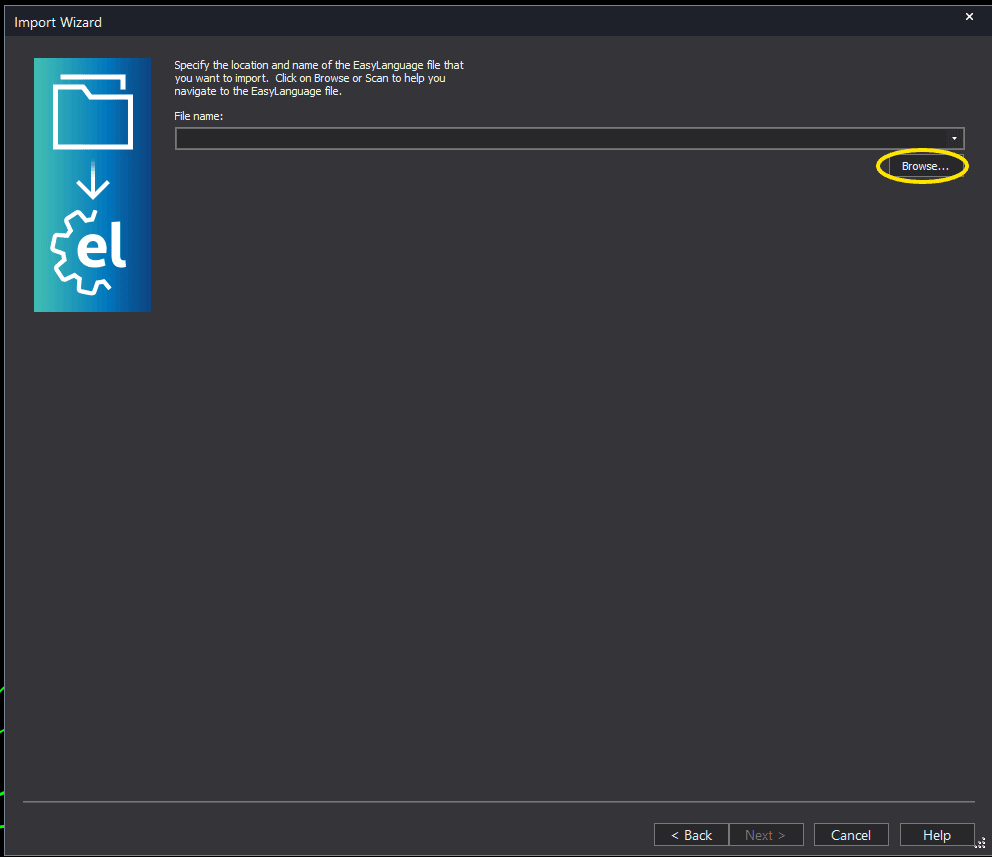
Step 4: Browse for the file
Click the Browse button to open a file browser where you can locate your downloaded .ELD file.
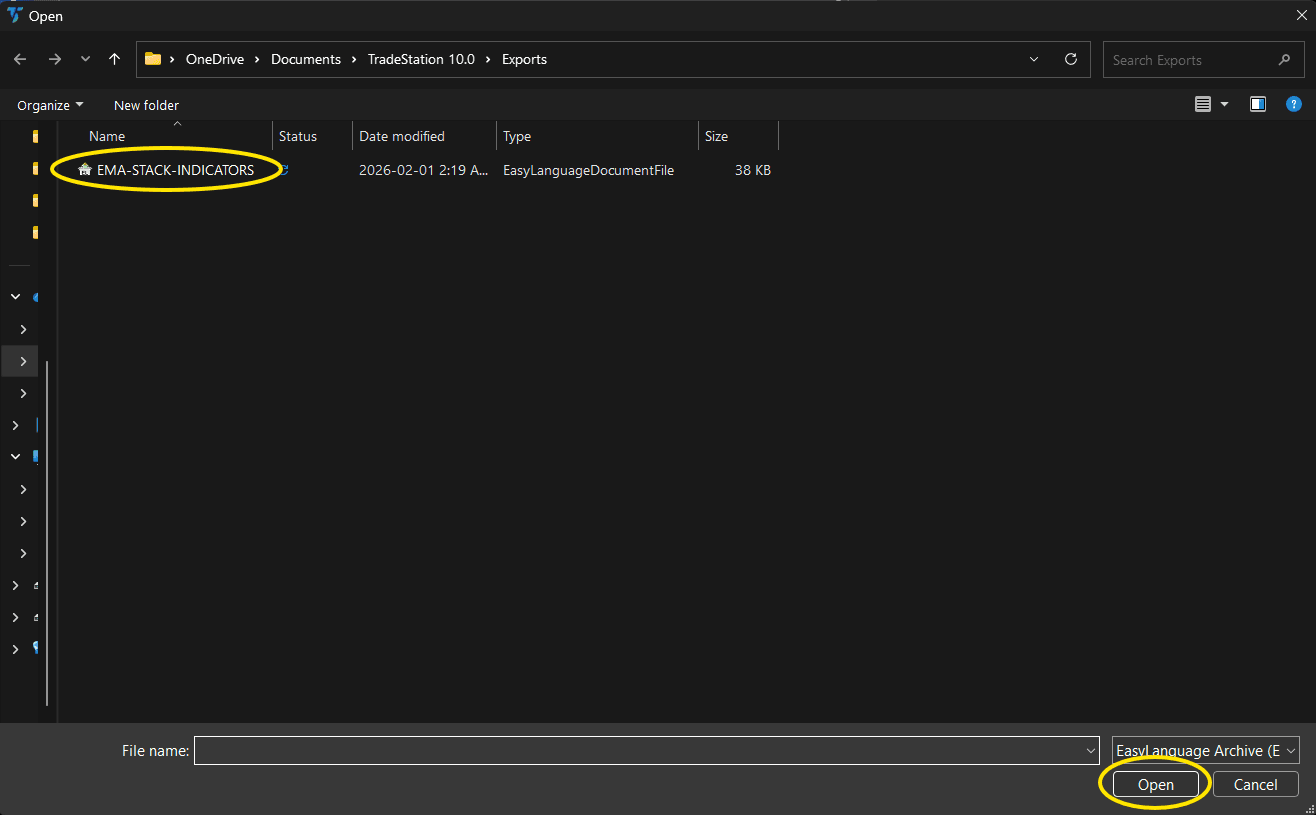
Step 5: Select and open the file
Navigate to the folder where you saved the .ELD file. Select liquidity-sweep-showme.eld and click Open. The file name shown may differ from the screenshot — look for your downloaded indicator file.
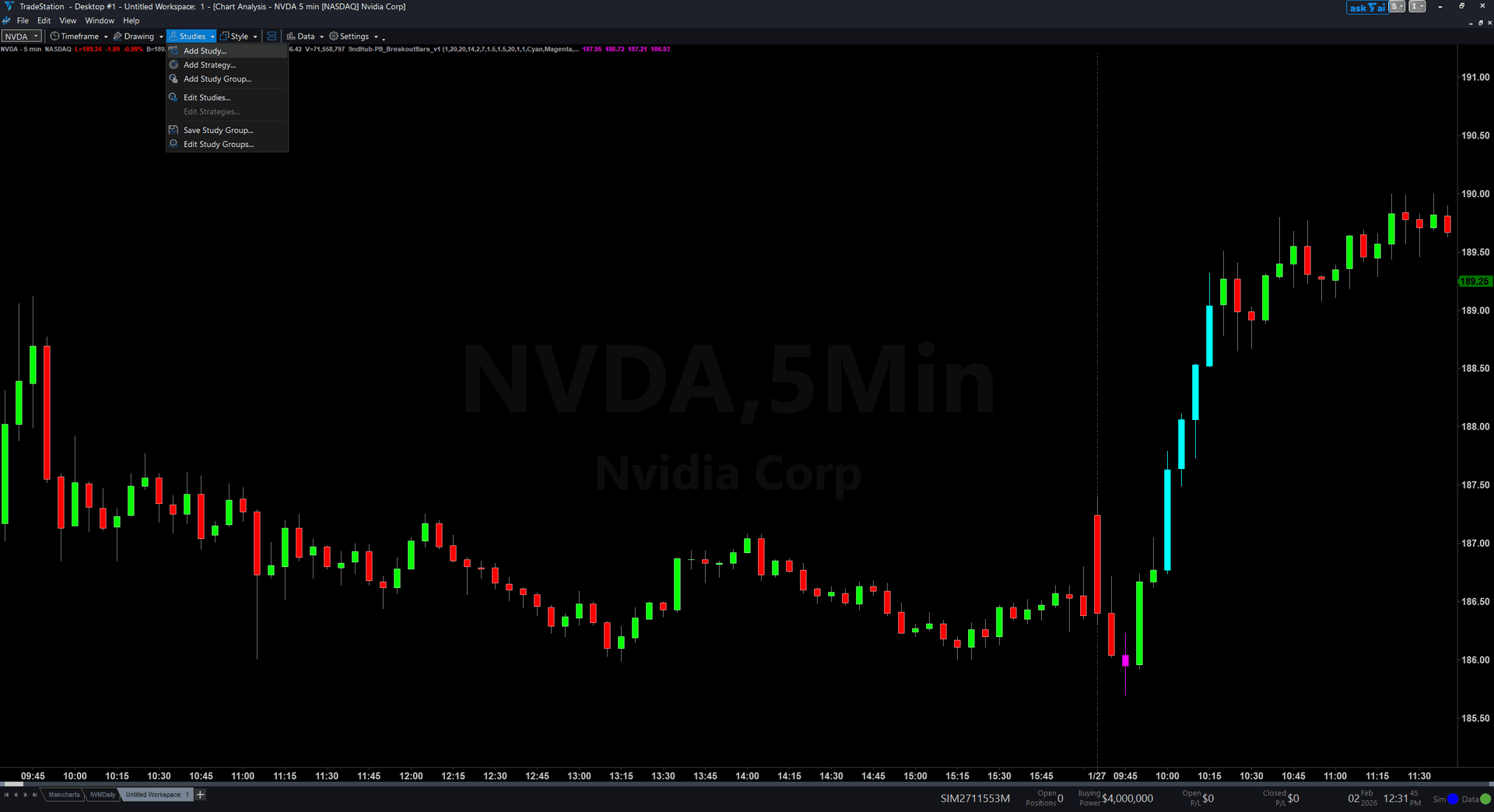
Step 6: Open the Studies menu
On your chart, click the Studies dropdown in the toolbar and select Add Study.
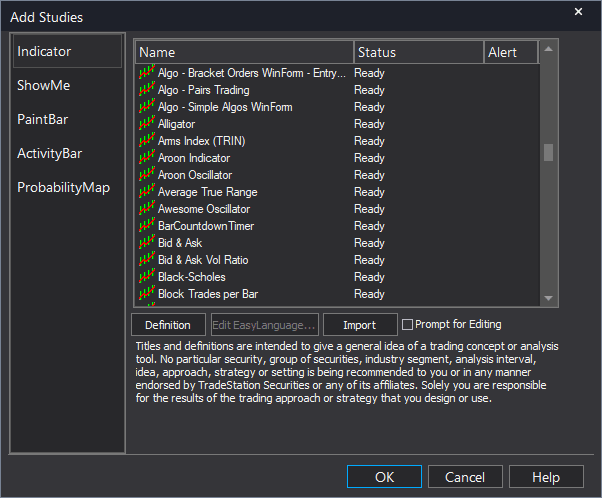
Step 7: Select the ShowMe study
In the Add Studies dialog, click the ShowMe tab on the left side. Find "!IndHub-SM_LiqSweep_v1" in the list, select it, and click OK to apply.
Step 8: Configure settings (optional)
Right-click anywhere on the chart, go to Studies > Edit Studies..., select the indicator, and click the Inputs tab. Key inputs: SwingStrength (default 5), MaxLevels (default 10), MaxAge (default 50), MinSweepDepth (default 0.1 ATR), DotOffset (default 0.3 ATR), ShowLabels (default true), AlertOnSweep (default true). For dot appearance, go to the Plots tab and set the plot style to Point with your preferred weight.
Common Issues
The text labels show negative volume percentages. Does that mean the sweep is invalid?
A negative volume percentage means the sweep bar had below-average volume. While high-volume sweeps are more reliable, low-volume sweeps are not automatically invalid — they can still represent genuine stop hunts during quiet market periods. Use volume as one factor alongside depth and level age. However, if you want to filter for high-conviction signals only, focus on sweeps with positive volume percentages and deep penetration.
I see sweep dots but the quality metrics look weak (shallow depth, low volume). Should I trade these?
Weak-quality sweeps have a lower probability of producing meaningful reversals. The best approach is to be selective: only trade sweeps with Depth above 0.2 ATR, Volume above +25%, and Age above 10 bars. If you want to reduce noise signals entirely, increase MinSweepDepth to 0.2 or 0.3 ATR to require deeper penetration before a sweep qualifies.
Can I hide the text labels and show only dots?
Yes. Set ShowLabels to false in the indicator inputs. You will see clean colored dots without any text annotations. If you want detailed metrics only sometimes, keep ShowLabels on and zoom in when evaluating specific signals.
For additional help, contact support.